Documentatie TrackGPS
TrackGPS Documentation
TrackGPS Documentation
To access the methods available in the AROBS TrackGPS API, follow these steps:
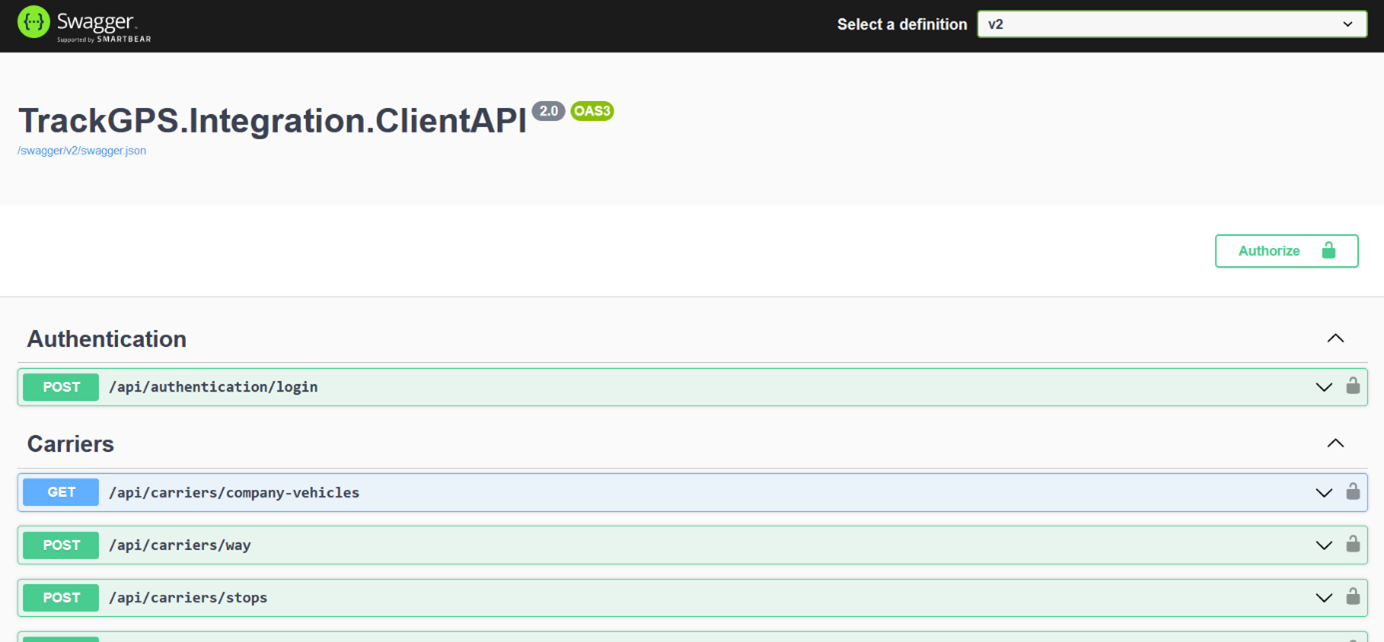
After clicking the link in the “API Link” field, a new page called Swagger will open in your browser. This page provides additional information about the available API methods.
It is important to select the “V2” version of the web service from the top right corner. The page will look like this:
The Application Programming Interface (API) is a software interface that allows interaction between two applications without user intervention. An API is a collection of software functions and procedures. In simple terms, an API is software code that can be accessed or executed. An API is defined as code that helps two different software systems communicate and exchange data with each other.
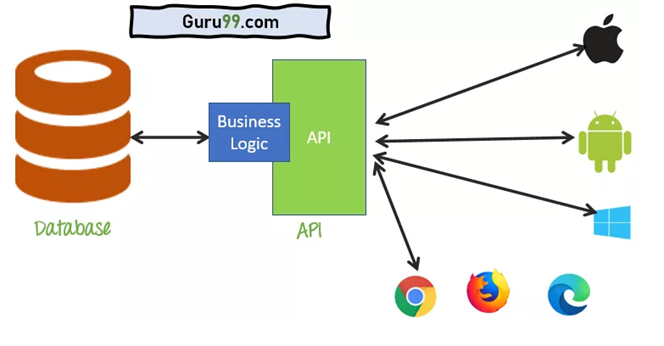
A Web API is an application programming interface that is used either for a web server or a web browser.
The API has 2 components:
Server Side:
The server-side web API is a programmed interface consisting of one or more publicly exposed endpoints to a defined request-response messaging system.
The AROBS TrackGPS API is a RESTful API that returns information (raw data) in JSON format using specific existing methods.
Client Side:
The end user can extract raw data (using the methods mentioned above) and use it in various applications, reports, and/or functionalities.
The TrackGPS REST API has a default request limit to ensure the performance and stability of the service. Currently, the limit is 1 request every 30 seconds. This means each user can send one request to the API every 30 seconds.
Exception: The login endpoint is not subject to this rate limit and can be accessed without restrictions.
If the request limit of 1 request every 30 seconds is exceeded, the server will return an HTTP status code 429 (Too Many Requests). This code indicates that the user has sent too many requests in a short period.
In addition to the status code, users will also receive a specific error message.
Users are advised to wait before sending additional requests to avoid receiving this error code.
In certain situations, if it is necessary to modify the request limit, please contact the support department to discuss the available options.
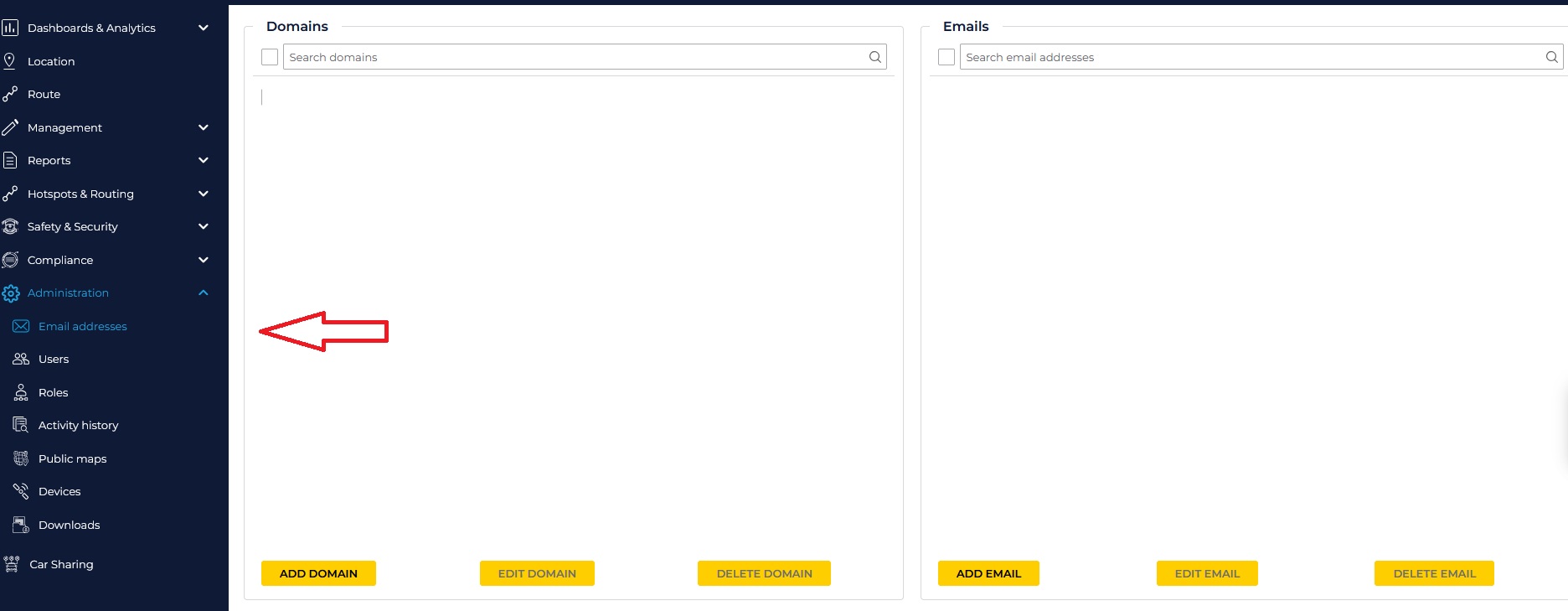
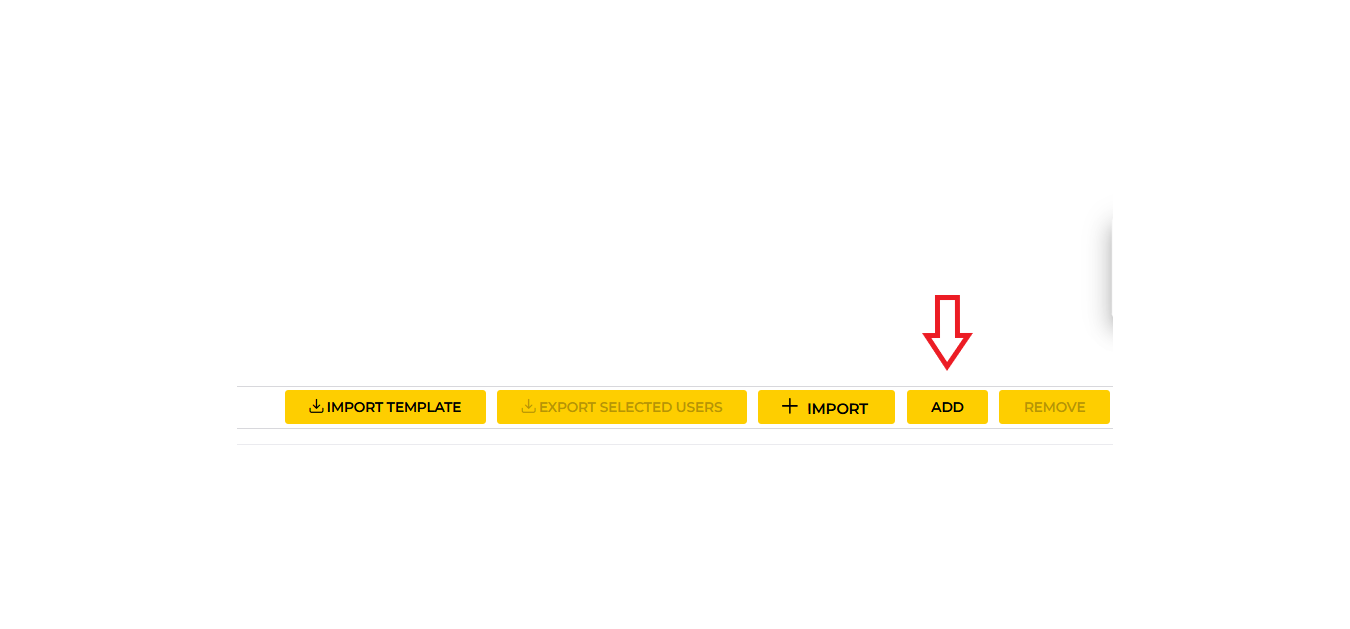
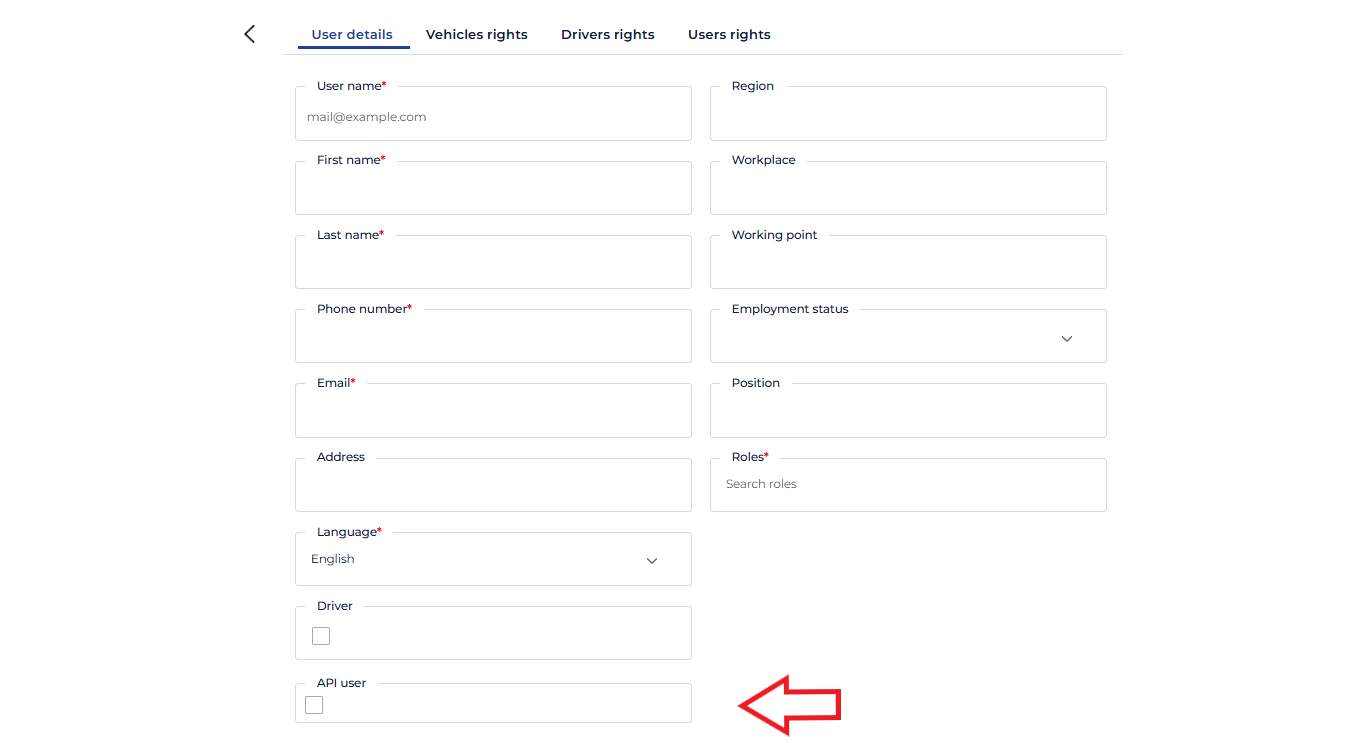
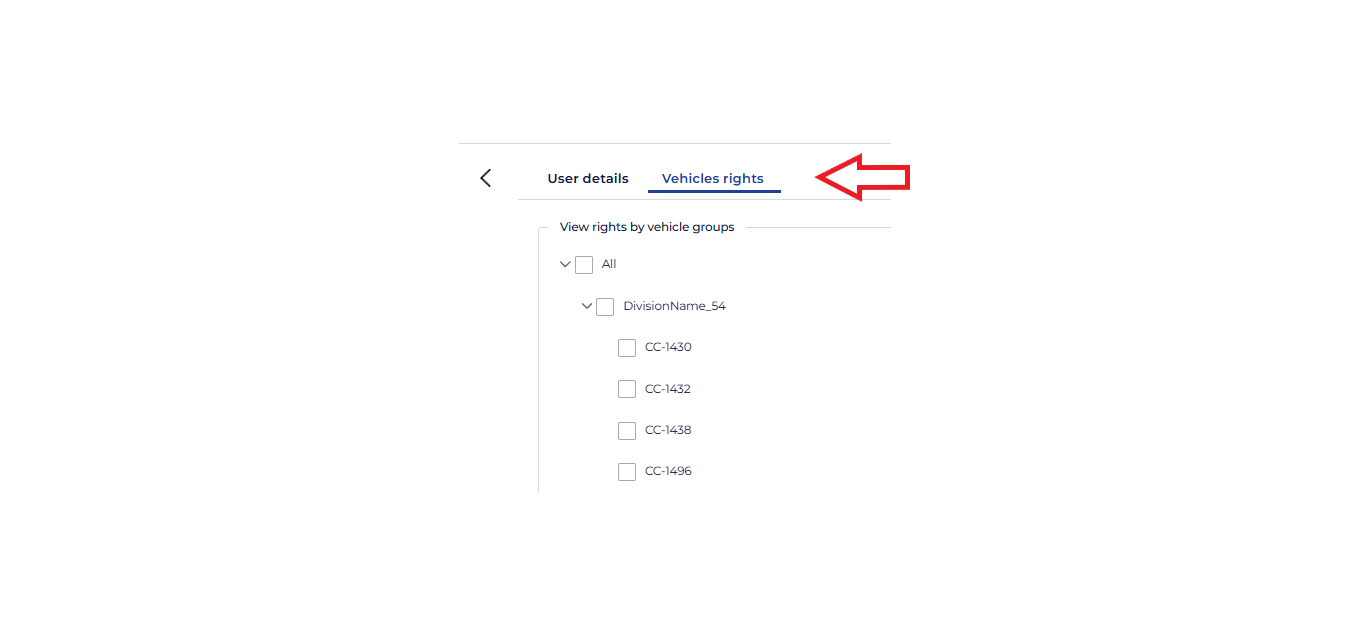
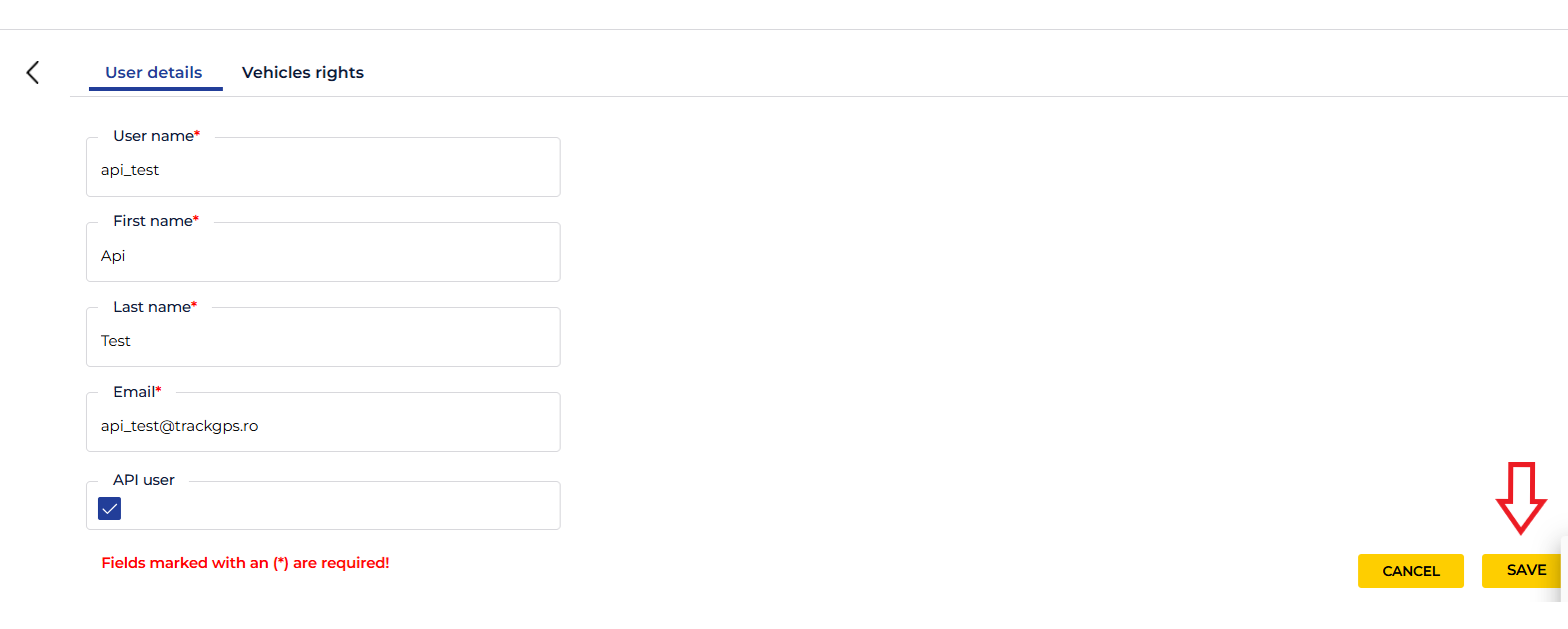
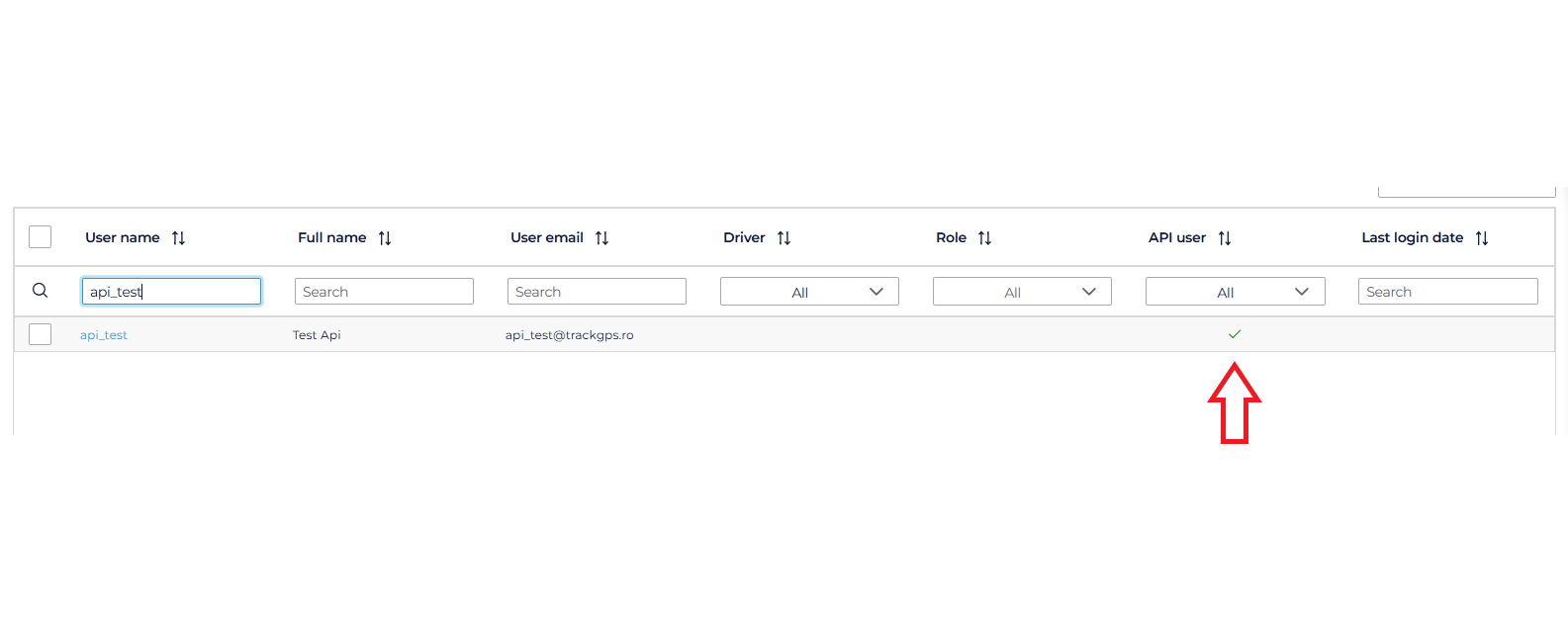
To authenticate, the user must have a username and password. The login credentials for the API are not the same as the credentials for logging into the AROBS TrackGPS fleet management platform, so it is necessary to create special users for API access. API users can be created directly from the AROBS TrackGPS web platform by following the steps below:

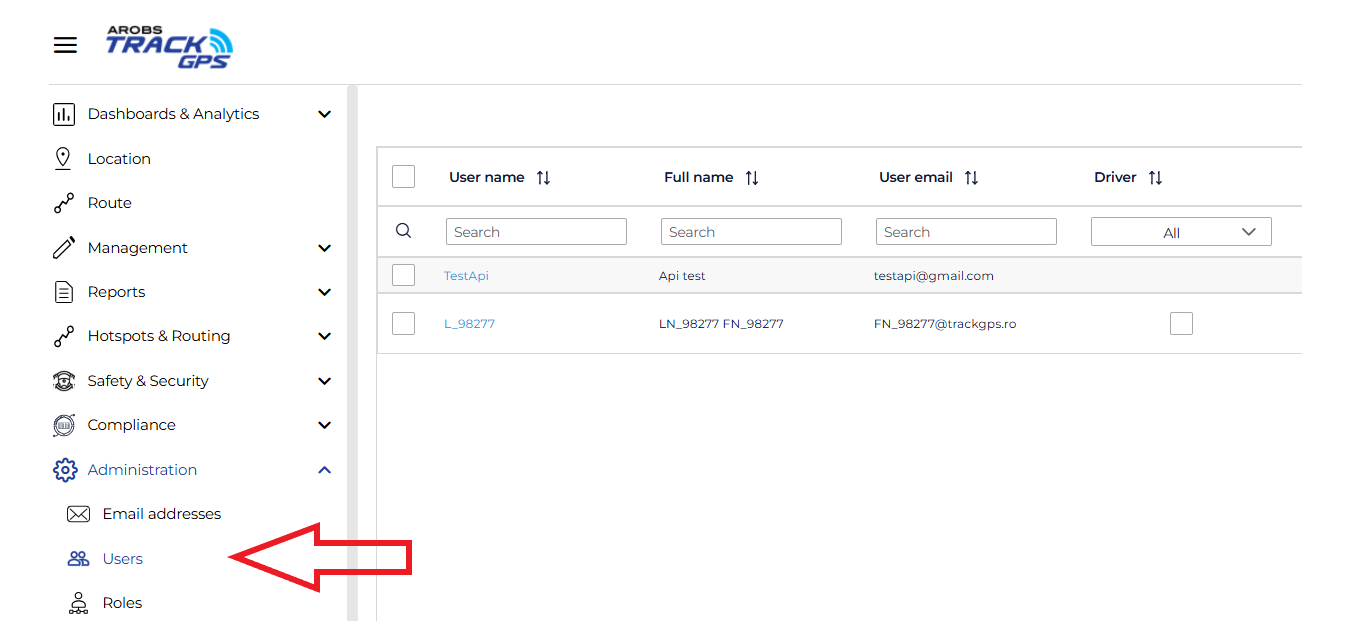
Attention: This user cannot be used to log into the AROBS TrackGPS
platform. Also, a user who does not have the “API User” option checked
cannot be used for API data access.
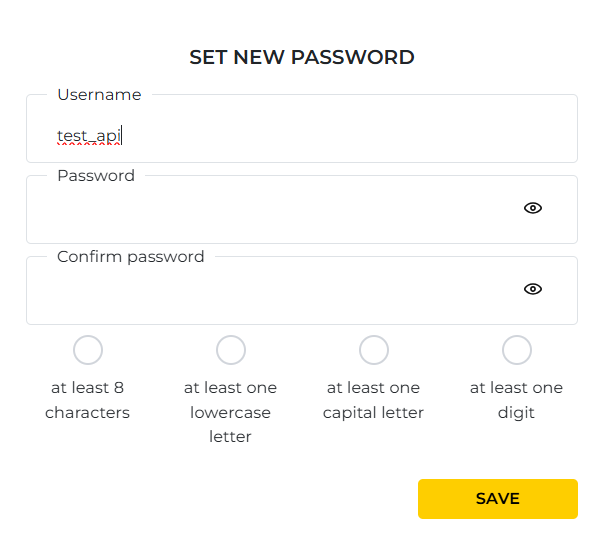
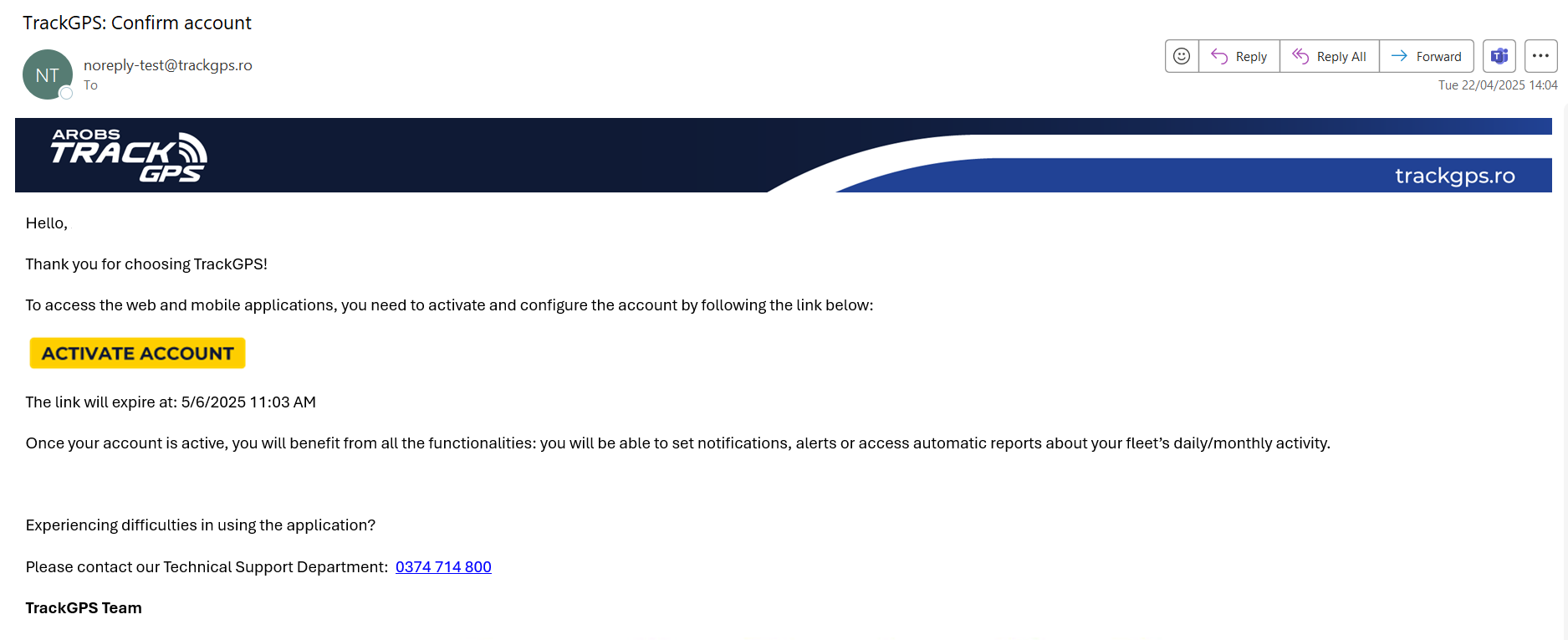 Immediately after clicking the button, a password setup page will open,
as shown in the image below:
Immediately after clicking the button, a password setup page will open,
as shown in the image below:
Rate Limit: At least 30 seconds between two consecutive requests or according to the limit set for the user.
| Method | URL | Description |
|---|---|---|
| POST | https://api.trackgps.ro/api/authentication/login?api-version=2.0 |
Login |
The API allows retrieval of raw vehicle data through the following endpoints:
| Method | URL | Description |
|---|---|---|
| GET | https://api.trackgps.ro/api/carriers/company-vehicles?api-version=2.0 |
List vehicles |
| POST | https://api.trackgps.ro/api/carriers/way?api-version=2.0 |
Vehicle ways |
| POST | https://api.trackgps.ro/api/carriers/stops?api-version=2.0 |
Stops |
| POST | https://api.trackgps.ro/api/carriers/consumption?api-version=2.0 |
Fuel consumption |
| POST | https://api.trackgps.ro/api/carriers/refills?api-version=2.0 |
Refueling data |
| POST | https://api.trackgps.ro/api/carriers/temperatures?api-version=2.0 |
Temperature data |
The API allows management of transports in the company account through the following endpoints:
| Method | URL | Description |
|---|---|---|
| POST | https://api.trackgps.ro/api/eTransport/add-transport?api-version=2.0 |
Add transport |
| POST | https://api.trackgps.ro/api/eTransport/update-transport?api-version=2.0 |
Update transport |
| POST | https://api.trackgps.ro/api/eTransport/load-transports?api-version=2.0 |
List transports |
| POST | https://api.trackgps.ro/api/eTransport/remove-transports?api-version=2.0 |
Remove transports |
| POST | https://api.trackgps.ro/api/eTransport/start-transports?api-version=2.0 |
Start transports |
| POST | https://api.trackgps.ro/api/eTransport/end-transports?api-version=2.0 |
End transports |
| POST | https://api.trackgps.ro/api/eTransport/pause-transports?api-version=2.0 |
Pause transports |
After obtaining the API credentials (username and password), use the login endpoint to generate an authentication token valid for 1 hour. This authentication token is required to extract raw data using the other endpoints.
A new token must be generated every hour to continue extracting raw data from the AROBS TrackGPS system.
The login endpoint is used for authenticating users within the API.
It receives a username and password in the request body, and if the authentication is valid, it returns an access token (JWT) along with a refresh token.
These tokens must be used to authorize requests to protected API resources.
⚠️ All requests to this endpoint must include the
api-version=2.0parameter in the URL.
URL:POST https://api.trackgps.ro/api/authentication/login?api-version=2.0
Requests to this endpoint must be of type POST and include:
Query parameter:
api-version: the API version. Recommended value: 2.0.The payload must be sent in the request body as form data with the following structure:
{
  "username": "user@example.com",
  "password": "SecretPassword123"
}A successful response (HTTP 200) will have the following format:
{
    "access_token": "eyJhbGciOavJZdtmkv3s9OW4ljE2V225_uTkntrDo-SDYwFGgYLbpQ",
    "expires_in": 28800,
    "token_type": "Bearer",
    "refresh_token": "8E65181908146821C79E26259683DF6F-1",
    "scope": "CarPoolingAPI IdentityServerApi offline_access openid profile TrackGPSV4Api"
}At this time, the API provided by AROBS TrackGPS allows the use of 5 endpoints to obtain raw data:
| Method | URL | Description |
|---|---|---|
| GET | https://api.trackgps.ro/api/carriers/company-vehicles?api-version=2.0 |
List vehicles |
| POST | https://api.trackgps.ro/api/carriers/way?api-version=2.0 |
Vehicle ways |
| POST | https://api.trackgps.ro/api/carriers/stops?api-version=2.0 |
Stops |
| POST | https://api.trackgps.ro/api/carriers/consumption?api-version=2.0 |
Fuel consumption |
| POST | https://api.trackgps.ro/api/carriers/refills?api-version=2.0 |
Refueling data |
| POST | https://api.trackgps.ro/api/carriers/temperatures?api-version=2.0 |
Temperature data |
The minimum interval between two successive requests can be 30 seconds.
The CompanyVehicles method returns the list of vehicles and their details. It only returns vehicles to which the user has access.
From the response of this method, you can retrieve the vehicleId values, which can be used in subsequent API calls.
This method is subject to Rate Limit restrictions.
⚠️ All requests to this endpoint must include the
api-version=2.0parameter in the URL.
URL:GET https://api.trackgps.ro/api/carriers/company-vehicles?api-version=2.0
⚠️ Note: All date and time values sent or returned by this endpoint are in the company’s local time zone.
{
  "payload": [
    {
      "vehicleId": 0,
      "vehicleUId": "3fa85f64-5717-4562-b3fc-2c963f66afa6",
      "vehicleName": "string",
      "vehicleRegistrationNumber": "string",
      "latitude": 0,
      "longitude": 0,
      "gpsDate": "2024-09-09T08:52:55.005",
      "address": "string",
      "speed": 0,
      "course": 0,
      "engineEvent": 0,
      "engineRpm": 0,
      "engineEventDate": "2024-09-09T08:52:55.005",
      "serverDate": "2024-09-09T08:52:55.005",
      "isPrivate": true,
      "vehicleIdentificationNumber": "string",
      "externalPowerVoltage": 0,
      "vehicleManufacturer": "string",
      "vehicleModel": "string",
      "manufactureYear": 0
    }
  ],
  "correlationId": "3fa85f64-5717-4562-b3fc-2c963f66afa6",
  "failureReasons": [
    {
      "errorCode": "string",
      "errorParameters": [
        "string"
      ]
    }
  ],
  "isSuccess": true
}The Way method returns the list of vehicle locations for the period provided as a parameter.
It only returns vehicles to which the user has access.
The method accepts as parameters a list of up to 10 vehicleId values and a period of up to 31 days.
It is subject to the restrictions described in Rate Limit
⚠️ All requests to this endpoint must include the
api-version=2.0parameter in the URL.
URL:POST https://api.trackgps.ro/api/carriers/way?api-version=2.0
⚠️ Note: All date and time values sent or returned by this endpoint are in the company’s local time zone.
{
  "vehiclesList": [
    0
  ],
  "startDate": "2024-09-09T09:21:50.133Z",
  "endDate": "2024-09-09T09:21:50.133Z"
}vehicleId values for which you want to obtain locations.{
"payload": [
{
"vehicleId": 0,
"gpsDate": "2024-09-09T09:21:50.134",
"latitude": 0,
"longitude": 0,
"speed": 0,
"course": 0
}
],
"correlationId": "3fa85f64-5717-4562-b3fc-2c963f66afa6",
"failureReasons": [
{
"errorCode": "string",
"errorParameters": [
"string"
]
}
],
"isSuccess": true
}The Stops method returns a list of vehicle stops within the requested period.
It only returns data for vehicles the user has access to.
If the list contains at least one vehicle the user does not have access to, a response with error code 401 will be returned.
It is subject to the Rate Limit restrictions.
⚠️ All requests to this endpoint must include the
api-version=2.0parameter in the URL.
URL:POST https://api.trackgps.ro/api/carriers/stops?api-version=2.0
⚠️ Note: All date and time values sent or returned by this endpoint are in the company’s local time zone.
{
  "vehiclesList": [
    0
  ],
  "startDate": "2024-09-09T09:49:19.549",
  "endDate": "2024-09-09T09:49:19.549",
  "stationaryMargin": 0
}{
"payload": [
{
"results": {
"additionalProp1": [
{
"vehicleId": 0,
"startDate": "2025-04-11T14:33:30.175",
"endDate": "2025-04-11T14:33:30.175",
"latitude": 0,
"longitude": 0,
"stationaryEngineOnTime": 0,
"distance": 0,
"maxSpeed": 0,
"averageSpeed": 0,
"speedCount": 0,
"indexKm": 0,
"indexHours": 0,
"address": "string",
"stopDuration": 0,
"engineOnStops": [
{
"startDate": "2025-04-11T14:33:30.175",
"endDate": "2025-04-11T14:33:30.175",
"duration": 0
}
],
"hotSpot": "string",
"functioningTime": 0,
"isPrivate": true,
"drivers": [
{
"firstName": "string",
"lastName": "string"
}
],
"fuelConsumption": 0
}
],
"additionalProp2": [
{
"vehicleId": 0,
"startDate": "2025-04-11T14:33:30.175",
"endDate": "2025-04-11T14:33:30.175",
"latitude": 0,
"longitude": 0,
"stationaryEngineOnTime": 0,
"distance": 0,
"maxSpeed": 0,
"averageSpeed": 0,
"speedCount": 0,
"indexKm": 0,
"indexHours": 0,
"address": "string",
"stopDuration": 0,
"engineOnStops": [
{
"startDate": "2025-04-11T14:33:30.175",
"endDate": "2025-04-11T14:33:30.175",
"duration": 0
}
],
"hotSpot": "string",
"functioningTime": 0,
"isPrivate": true,
"drivers": [
{
"firstName": "string",
"lastName": "string"
}
],
"fuelConsumption": 0
}
],
"additionalProp3": [
{
"vehicleId": 0,
"startDate": "2025-04-11T14:33:30.175",
"endDate": "2025-04-11T14:33:30.175",
"latitude": 0,
"longitude": 0,
"stationaryEngineOnTime": 0,
"distance": 0,
"maxSpeed": 0,
"averageSpeed": 0,
"speedCount": 0,
"indexKm": 0,
"indexHours": 0,
"address": "string",
"stopDuration": 0,
"engineOnStops": [
{
"startDate": "2025-04-11T14:33:30.175",
"endDate": "2025-04-11T14:33:30.175",
"duration": 0
}
],
"hotSpot": "string",
"functioningTime": 0,
"isPrivate": true,
"drivers": [
{
"firstName": "string",
"lastName": "string"
}
],
"fuelConsumption": 0
}
]
}
}
],
"correlationId": "3fa85f64-5717-4562-b3fc-2c963f66afa6",
"failureReasons": [
{
"errorCode": "string",
"errorParameters": [
"string"
]
}
],
"isSuccess": true
}The Consumption method returns information about fuel consumption, distance, operating hours, as well as the average consumption per 100 km for a vehicle during the requested period. The method can be called for a list of up to 10 vehicles and a period of up to 31 days. If the vehicle is equipped with LPG, data will be returned for both sources.
It is subject to the Rate Limit restrictions.
⚠️ All requests to this endpoint must include the
api-version=2.0parameter in the URL.
URL:POST https://api.trackgps.ro/api/carriers/consumption?api-version=2.0
⚠️ Note: All date and time values sent or returned by this endpoint are in the company’s local time zone.
{
  "vehiclesList": [
    0
  ],
  "startDate": "2024-09-09T07:15:14.124",
  "endDate": "2024-09-09T07:15:14.124"
}{
"payload": [
{
"vehicleName": "string",
"licensePlate": "string",
"distance": 0,
"hours": "string",
"consumptionValue": 0,
"averageConsumption100Km": 0,
"secondarySource": {
"distance": 0,
"hours": "string",
"consumptionValue": 0,
"averageConsumption100Km": 0
}
}
],
"correlationId": "3fa85f64-5717-4562-b3fc-2c963f66afa6",
"failureReasons": [
{
"errorCode": "string",
"errorParameters": [
"string"
]
}
],
"isSuccess": true
}If the secondary source contains data, to obtain the totals you must sum the data from the primary and secondary sources. For example:
{
  "payload": [
    {
      "vehicleName": "Vehicle A",
      "licensePlate": "AB-12-BCD",
      "distance": 100,
      "hours": "10:00:00",
      "consumptionValue": 50,
      "averageConsumption100Km": 5,
      "secondarySource": {
        "distance": 50,
        "hours": "5:00:00",
        "consumptionValue": 20,
        "averageConsumption100Km": 4
      }
    }
  ],
  "correlationId": "3fa85f64-5717-4562-b3fc-2c963f66afa6",
  "isSuccess": true
}
Totals:
The Refills method returns a list of refueling or fuel level decrease events detected within the requested period.
It only returns data for vehicles to which the user has access.
If the list contains at least one vehicle to which the user does not have access, a response with error code 401 will be returned.
This method is subject to Rate Limit restrictions.
⚠️ All requests to this endpoint must include the
api-version=2.0parameter in the URL.
URL:POST https://api.trackgps.ro/api/carriers/refills?api-version=2.0
⚠️ Note: All date and time values sent or returned by this endpoint are in the company’s local time zone.
{
  "carrierId": 0,
  "startDate": "2024-09-09T09:42:51.835",
  "endDate": "2024-09-09T09:42:51.835"
}{
"payload": [
{
"date": "string",
"event": "string",
"location": "string",
"estimation": 0,
"isPrivate": true
}
],
"correlationId": "3fa85f64-5717-4562-b3fc-2c963f66afa6",
"failureReasons": [
{
"errorCode": "string",
"errorParameters": [
"string"
]
}
],
"isSuccess": true
}FuelStart: Initial fuel levelFueling: RefuelingPossibleFuelTheft: Possible fuel theftTotalRefill: Total refuelingsTotalPossibleTheft: Total possible fuel theftsRemainingFuel: Remaining fuelTotalFuelConsumption: Total fuel consumptionFuelStartSecondarySource: Start of refueling from secondary sourceFuelingSecondarySource: Refueling from secondary sourcePossibleFuelTheftSecondarySource: Possible fuel theft from secondary sourceTotalRefillSecondarySource: Total refuelings from secondary sourceTotalPossibleTheftSecondarySource: Total possible thefts from secondary sourceRemainingFuelSecondarySource: Remaining fuel from secondary sourceTotalFuelConsumptionSecondarySource: Total fuel consumption from secondary sourceThe Temperatures method returns a list of recorded temperatures for the requested period. It only returns data for vehicles the user has access to.
If the list contains at least one vehicle the user does not have access to, a response with error code 401 will be returned.
This method is subject to Rate Limit restrictions.
⚠️ All requests to this endpoint must include the
api-version=2.0parameter in the URL.
URL:POST https://api.trackgps.ro/api/carriers/temperatures?api-version=2.0
⚠️ Note: All date and time values sent or returned by this endpoint are in the company’s local time zone.
{
  "vehiclesList": [
    0
  ],
  "startDate": "2024-09-09T09:49:19.549",
  "endDate": "2024-09-09T09:49:19.549"
}vehiclesList: The list of vehicles for which temperature data is requested.startDate: The start date of the period for which data is requested.endDate: The end date of the period for which data is requested.{
"payload": [
{
"temperature": [
{
"vehicleId": 0,
"date": "2025-04-11T12:33:11.817",
"value": 0,
"sensorNumber": 0
}
],
"humidity": [
{
"vehicleId": 0,
"date": "2025-04-11T12:33:11.817",
"value": 0,
"sensorNumber": 0
}
]
}
],
"correlationId": "3fa85f64-5717-4562-b3fc-2c963f66afa6",
"failureReasons": [
{
"errorCode": "string",
"errorParameters": [
"string"
]
}
],
"isSuccess": true
}payload: Contains the results with temperature data.correlationId: A unique identifier for correlating the request and response.failureReasons: The reasons why the request failed, if any.isSuccess: Indicates whether the request was successful.At this time, the API provided by AROBS TrackGPS allows the use of 7 endpoints to manage transports in the company’s account:
| Method | URL | Description |
|---|---|---|
| POST | https://api.trackgps.ro/api/eTransport/add-transport?api-version=2.0 |
Add transport |
| POST | https://api.trackgps.ro/api/eTransport/update-transport?api-version=2.0 |
Update transport |
| POST | https://api.trackgps.ro/api/eTransport/load-transports?api-version=2.0 |
List transports |
| POST | https://api.trackgps.ro/api/eTransport/remove-transports?api-version=2.0 |
Remove transports |
| POST | https://api.trackgps.ro/api/eTransport/start-transports?api-version=2.0 |
Start transports |
| POST | https://api.trackgps.ro/api/eTransport/end-transports?api-version=2.0 |
End transports |
| POST | https://api.trackgps.ro/api/eTransport/pause-transports?api-version=2.0 |
Pause transports |
The minimum interval between two consecutive requests is 30 seconds.
The add-transport endpoint allows you to add a new transport to the system. The user can specify all details related to the transport, including the associated vehicle, start and end dates, locations, and additional information such as the associated trailer.
It is subject to the restrictions in Rate Limit
⚠️ All requests to this endpoint must include the
api-version=2.0parameter in the URL.
URL:POST https://api.trackgps.ro/api/eTransport/add-transport?api-version=2.0
Requests to this endpoint must be of type POST and include the following parameters:
Query parameter:
api-version (string, required) – API version. Recommended value: 2.0Body (JSON):
{
  "vehicleUId": "3fa85f64-5717-4562-b3fc-2c963f66afa6",
  "startDate": "2025-04-09T07:38:24.380Z",
  "endDate": "2025-04-09T07:38:24.380Z",
  "codeUit": "string",
  "notes": "string",
  "startLocation": "string",
  "endLocation": "string",
  "vatNumber": "string",
  "validityStartDate": "2025-04-09T07:38:24.380Z",
  "validityEndDate": "2025-04-09T07:38:24.380Z",
  "trailer1Code": "string",
  "trailer2Code": "string"
}| Parameter | Type | Required | Description |
|---|---|---|---|
| vehicleUId | string | Yes | Unique identifier of the vehicle associated with the transport. |
| startDate | string | No | Start date and time for sending GPS data to the ANAF platform (ISO 8601 format, UTC). |
| endDate | string | No | End date and time for sending GPS data to the ANAF platform (ISO 8601 format, UTC). |
| codeUit | string | Yes | UIT code generated by ANAF. |
| notes | string | No | Additional notes about the transport. |
| startLocation | string | No | Start location of the transport. |
| endLocation | string | No | End location of the transport. |
| vatNumber | string | Yes | Carrier’s VAT number (CIF). |
| validityStartDate | string | Yes | Start date of UIT code validity. This date is generated by the ANAF platform (ISO 8601 format, UTC). |
| validityEndDate | string | Yes | End date of UIT code validity. This date is generated by the ANAF platform (ISO 8601 format, UTC). |
| trailer1Code | string | No | Registration number for the first trailer. |
| trailer2Code | string | No | Registration number for the second trailer. |
🕒 Important: All date fields (e.g.
startDate,endDate,validityStartDate,validityEndDate) must be sent in UTC format.
{
  "payload": true,
  "correlationId": "3fa85f64-5717-4562-b3fc-2c963f66afa6",
  "failureReasons": [
    {
      "errorCode": "string",
      "errorParameters": [
        "string"
      ]
    }
  ],
  "isSuccess": true
}| Property | Type | Description |
|---|---|---|
| payload | boolean | Indicates whether the transport was successfully added (true or false). |
| correlationId | string | Request identifier for correlating responses. |
| failureReasons | array | List of error reasons (if any), with additional details. |
| isSuccess | boolean | Indicates whether the request was processed successfully (true or false). |
| HTTP Code | Description |
|---|---|
| 400 | Missing parameters or invalid structure. |
| 401 | Incorrect credentials or unauthorized user. |
| 429 | Rate limit exceeded for the user. |
The update-transport endpoint allows you to modify an existing transport in the system. You can update details such as the period, locations, notes, or trailer information.
It is subject to the restrictions in Rate Limit
⚠️ All requests to this endpoint must include the
api-version=2.0parameter in the URL.
URL:POST https://api.trackgps.ro/api/eTransport/update-transport?api-version=2.0
Requests to this endpoint must be of type POST and include the following parameters:
Query parameter:
api-version (string, required) – The API version. Recommended value: 2.0Body (JSON):
{
  "transportUId": "3fa85f64-5717-4562-b3fc-2c963f66afa6",
  "vehicleUId": "3fa85f64-5717-4562-b3fc-2c963f66afa6",
  "startDate": "2025-04-09T07:38:24.380Z",
  "endDate": "2025-04-09T07:38:24.380Z",
  "notes": "string",
  "startLocation": "string",
  "endLocation": "string",
  "vatNumber": "string",
  "validityStartDate": "2025-04-09T07:38:24.380Z",
  "validityEndDate": "2025-04-09T07:38:24.380Z",
  "trailer1Code": "string",
  "trailer2Code": "string"
}| Parameter | Type | Required | Description |
|---|---|---|---|
| transportUId | string | Yes | The identifier of the transport to be updated. |
| vehicleUId | string | Yes | The identifier of the vehicle associated with the transport. |
| startDate | string | No | Start date and time for GPS data transmission to the ANAF platform (ISO 8601, UTC format). |
| endDate | string | No | End date and time for GPS data transmission to the ANAF platform (ISO 8601, UTC format). |
| validityStartDate | string | Yes | Start date of the UIT code validity. Generated by the ANAF platform (ISO 8601, UTC format). |
| validityEndDate | string | Yes | End date of the UIT code validity. Generated by the ANAF platform (ISO 8601, UTC format). |
| notes | string | No | Additional notes. |
| startLocation | string | No | Start location. |
| endLocation | string | No | End location. |
| vatNumber | string | Yes | Carrier’s VAT number (CIF). |
| trailer1Code | string | No | Registration number for the first trailer. |
| trailer2Code | string | No | Registration number for the second trailer. |
🕒 Important: Date fields (
startDate,endDate,validityStartDate,validityEndDate) must be sent in UTC format.
{
  "payload": true,
  "correlationId": "3fa85f64-5717-4562-b3fc-2c963f66afa6",
  "failureReasons": [
  {
    "errorCode": "string",
    "errorParameters": [
    "string"
    ]
  }
  ],
  "isSuccess": true
}| Property | Type | Description |
|---|---|---|
| payload | boolean | Indicates if the transport update was successful. |
| correlationId | string | Unique identifier for the request (for traceability and debugging). |
| failureReasons | array | List of error reasons (if any), with codes and parameters. |
| isSuccess | boolean | Indicates if the request was processed without errors (true or false). |
| HTTP Code | Description |
|---|---|
| 400 | Missing parameters or invalid structure. |
| 401 | Incorrect credentials or unauthorized user. |
| 429 | Rate limit exceeded for the user. |
The load-transports endpoint is used to retrieve the list of available transports in a user’s account, based on their vehicle access rights. The user can specify parameters to filter transports, such as their status or a specific search value.
This endpoint is subject to Rate Limit restrictions.
⚠️ All transport date/time fields in the response are recorded in the company’s time zone, not UTC. Ensure that transports are managed according to the company’s time zone settings when retrieved from the system.
⚠️ All requests to this endpoint must include the
api-version=2.0parameter in the URL.
URL:POST https://api.trackgps.ro/api/eTransport/load-transports?api-version=2.0
⚠️ Transports with the status “Error” shown in the mobile and web applications are not returned by this endpoint.
Requests to this endpoint must be of type POST and include the following parameters:
Query parameter:
api-version (string, required) – The API version. Recommended value: 2.0Body (JSON):
{
  "pageSize": 0,
  "pageIndex": 0,
  "statusIds": [
  1
  ],
  "searchValue": "string"
}| Parameter | Type | Required | Description |
|---|---|---|---|
| pageSize | number | No | Number of items returned per page. |
| pageIndex | number | No | Page index for the request. |
| statusIds | array | Yes | List of transport status IDs to filter by. |
| searchValue | string | No | Word or phrase to search in the transport list. |
| Id | Description |
|---|---|
| 1 | Pending |
| 2 | In Progress |
| 3 | Completed |
| 4 | Auto Completed |
| 5 | Error |
| 6 | Paused |
{
  "payload": {
  "totalRecords": 0,
  "transports": [
    {
    "uId": "3fa85f64-5717-4562-b3fc-2c963f66afa6",
    "carrierCode": "string",
    "carrierName": "string",
    "carrierUId": "3fa85f64-5717-4562-b3fc-2c963f66afa6",
    "trailer1Code": "string",
    "trailer2Code": "string",
    "codeUit": "string",
    "statusId": 0,
    "startDate": "2025-05-16T14:35:04.862Z",
    "endDate": "2025-05-16T14:35:04.862Z",
    "validityStartDate": "2025-05-16T14:35:04.862Z",
    "validityEndDate": "2025-05-16T14:35:04.862Z",
    "notes": "string",
    "startLocation": "string",
    "endLocation": "string",
    "externalId": 0,
    "externalResponse": "string",
    "lastSyncDate": "2025-05-16T14:35:04.862Z",
    "transmissionStatusCode": "string",
    "transmissionStatusErrorDescription": "string",
    "lastTransmissionDate": "2025-05-16T14:35:04.862Z",
    "lastGpsDate": "2025-05-16T14:35:04.862Z",
    "changeRequestMessage": "string",
    "changeRequestStatusCode": "string",
    "changeRequestCreatedAt": "2025-05-16T14:35:04.862Z",
    "changeRequestDate": "2025-05-16T14:35:04.862Z",
    "changeRequestAnafStatus": "string",
    "changeRequestAnafMessage": "string",
    "changeRequestAnafDate": "2025-05-16T14:35:04.862Z"
    }
  ]
  },
  "correlationId": "3fa85f64-5717-4562-b3fc-2c963f66afa6",
  "failureReasons": [
  {
    "errorCode": "string",
    "errorParameters": [
    "string"
    ]
  }
  ],
  "isSuccess": true
}| Property | Type | Description |
|---|---|---|
| payload | object | Object containing the returned transports and other relevant information. |
| totalRecords | number | Total number of available transports. |
| transports | array | List of available transports, each with specific details. |
| uId | string | Unique identifier of the transport. |
| carrierCode | string | Vehicle registration number used for transmitting location data to ANAF. |
| carrierName | string | Name of the vehicle used for transmitting location data to ANAF. |
| carrierUId | string | Unique identifier of the vehicle. |
| trailer1Code | string | Registration number for the first trailer. |
| trailer2Code | string | Registration number for the second trailer. |
| codeUit | string | UIT code generated by ANAF. |
| statusId | number | Transport status. |
| startDate | string | Start date and time of GPS data transmission to the ANAF platform. |
| endDate | string | End date and time of GPS data transmission to the ANAF platform. |
| validityStartDate | string | Start date of UIT code validity. This date is generated by the ANAF platform. |
| validityEndDate | string | End date of UIT code validity. This date is generated by the ANAF platform. |
| notes | string | Additional notes about the transport. |
| startLocation | string | Start location of the transport. |
| endLocation | string | End location of the transport. |
| externalId | number | Transport response identifier from the ANAF platform. |
| externalResponse | string | Response message from the ANAF platform for the transport. |
| lastSyncDate | string | Date when the transport was retrieved from the ANAF platform. |
| transmissionStatusCode | string | GPS data transmission status to the ANAF platform. |
| transmissionStatusErrorDescription | string | Error status description for GPS data transmission to the ANAF platform. |
| lastTransmissionDate | string | Date of the last GPS coordinate sent to the ANAF platform. |
| lastGpsDate | string | Date of the last GPS coordinate received from the vehicle. |
| changeRequestMessage | string | Response message for creating the transport data change request. |
| changeRequestStatusCode | string | Status of the transport data change request. |
| changeRequestCreatedAt | string | Date when the transport data change request was created. |
| changeRequestDate | string | Date when the response from the ANAF platform for the change request was received. |
| changeRequestAnafStatus | string | Status of the transport data change request received from the ANAF platform. |
| changeRequestAnafMessage | string | Response message for processing the transport data change request received from the ANAF platform. |
| changeRequestAnafDate | string | Date when the response from the ANAF platform for processing the change request was received. |
| correlationId | string | Request identifier for correlating responses. |
| failureReasons | array | List of error reasons (if any), with additional details. |
| isSuccess | boolean | Indicates whether the request was processed successfully (true) or not (false). |
| Code | Description |
|---|---|
Active |
Active transmission |
Finalized |
Transmission finalized |
NotInRomania |
Not on Romanian territory |
NotStarted |
Transmission pending |
Error |
Transmission error |
MissingETransportConfiguration |
e-Transport configuration error, please contact support |
OldData |
Data older than 6 hours |
NoGPSCoordinates |
No GPS signal |
WithoutTransmission |
No active GPS transmission |
| Code | Description |
|---|---|
RequestCreated |
Request created |
RequestSent |
Request sent successfully |
RequestErrorSent |
Error sending request |
ResponseSuccess |
Request completed successfully |
ResponseError |
Request completed with error |
| HTTP Code | Description |
|---|---|
| 400 | Missing parameters or invalid structure. |
| 401 | Incorrect credentials or unauthorized user. |
| 429 | Rate limit exceeded for the user. |
The remove-transports endpoint allows you to delete one or more transports from the system, based on their unique identifiers (transportUId). This action is irreversible and requires appropriate access rights for the targeted transports.
It is subject to the restrictions described in Rate Limit
⚠️ All requests to this endpoint must include the
api-version=2.0parameter in the URL.
URL:POST https://api.trackgps.ro/api/eTransport/remove-transports?api-version=2.0
Requests to this endpoint must use the POST method and include the following parameters:
Query parameter:
api-version (string, required) – The API version. Recommended value: 2.0Body (JSON):
{
  "transportsUids": [
  "3fa85f64-5717-4562-b3fc-2c963f66afa6"
  ]
}| Parameter | Type | Required | Description |
|---|---|---|---|
| transportsUids | array | Yes | List of unique identifiers (GUID) of the transports to be deleted. |
{
  "payload": true,
  "correlationId": "3fa85f64-5717-4562-b3fc-2c963f66afa6",
  "failureReasons": [
  {
    "errorCode": "string",
    "errorParameters": [
    "string"
    ]
  }
  ],
  "isSuccess": true
}| Property | Type | Description |
|---|---|---|
| payload | boolean | The result of the delete operation (true if successful). |
| correlationId | string | Unique identifier for the request, useful for traceability. |
| failureReasons | array | List of errors (if any), each with a code and parameters. |
| isSuccess | boolean | Indicates if the request was processed successfully (true or false). |
| HTTP Code | Description |
|---|---|
| 400 | Missing, invalid, or incorrectly formatted parameters. |
| 401 | Unauthenticated user or insufficient permissions. |
| 429 | Rate limit exceeded for the user. |
The start-transports endpoint allows you to start (activate) one or more already created transports. This action sets the start date of the transport and marks it as active in the system.
It is subject to the restrictions described in Rate Limit
⚠️ All requests to this endpoint must include the
api-version=2.0parameter in the URL.
URL:POST https://api.trackgps.ro/api/eTransport/start-transports?api-version=2.0
Requests to this endpoint must be of type POST and include the following parameters:
Query parameter:
api-version (string, required) – The API version. Recommended value: 2.0Body (JSON):
{
  "transports": [
    {
      "codeUit": "string"
    }
  ]
}| Parameter | Type | Required | Description |
|---|---|---|---|
| transports | array | Yes | List of transports to be started. |
| codeUit | string | Yes | Unique UIT identifier code of the transport. |
🕒 Important: All dates (
startDate) must be sent in UTC format.
{
  "payload": {
    "codeUit": "string",
    "isSuccess": true,
    "errors": [
      "string"
    ]
  },
  "correlationId": "3fa85f64-5717-4562-b3fc-2c963f66afa6",
  "failureReasons": [
    {
      "errorCode": "string",
      "errorParameters": [
        "string"
      ]
    }
  ],
  "isSuccess": true
}| Property | Type | Description |
|---|---|---|
| payload | boolean | Result of the start operation (true if successful). |
| correlationId | string | Unique request identifier, useful for traceability. |
| failureReasons | array | List of errors (if any), each with code and parameters. |
| isSuccess | boolean | Indicates if the request was processed successfully (true or false). |
| HTTP Code | Description |
|---|---|
| 400 | Missing, invalid, or incorrectly formatted parameters. |
| 401 | Unauthenticated user or insufficient permissions. |
| 429 | Rate limit exceeded for the user. |
The end-transports endpoint allows stopping one or more active transports based on the UIT code. By performing this action, the transports are marked as finished in the system and can no longer be modified.
It is subject to the restrictions from Rate Limit
⚠️ All requests to this endpoint must include the
api-version=2.0parameter in the URL.
URL:POST https://api.trackgps.ro/api/eTransport/end-transports?api-version=2.0
Requests to this endpoint must be of type POST and include the following parameters:
Query parameter:
api-version (string, required) – The API version. Recommended value: 2.0Body (JSON):
{
  "transports": [
    {
      "codeUit": "string"
    }
  ]
}| Parameter | Type | Required | Description |
|---|---|---|---|
| transports | array | Yes | List of transports to be stopped. |
| codeUit | string | Yes | Unique UIT identification code of the transport. |
🕒 Important: All dates (
endDate) must be sent in UTC format.
{
  "payload": {
    "codeUit": "string",
    "isSuccess": true,
    "errors": [
      "string"
    ]
  },
  "correlationId": "3fa85f64-5717-4562-b3fc-2c963f66afa6",
  "failureReasons": [
    {
      "errorCode": "string",
      "errorParameters": [
        "string"
      ]
    }
  ],
  "isSuccess": true
}| Property | Type | Description |
|---|---|---|
| payload | boolean | The result of the stop operation (true if successful). |
| correlationId | string | Unique request identifier, useful for traceability. |
| failureReasons | array | List of errors (if any), each with a code and parameters. |
| isSuccess | boolean | Indicates if the request was processed successfully (true or false). |
| HTTP Code | Description |
|---|---|
| 400 | Missing, invalid, or incorrectly formatted parameters. |
| 401 | Unauthenticated user or insufficient permissions. |
| 429 | Rate limit exceeded for the user. |
The pause-transports endpoint allows pausing the position transmission of an active transport, based on the UIT code. Similar to start and stop, transports are temporarily paused.
It is subject to the restrictions described in Rate Limit.
⚠️ All requests to this endpoint must include the
api-version=2.0parameter in the URL.
URL:POST https://api.trackgps.ro/api/eTransport/pause-transports?api-version=2.0
Requests to this endpoint must be of type POST and include the following parameters:
Query parameter:
api-version (string, required) – API version. Recommended value: 2.0Body (JSON):
{
  "transports": [
    {
      "codeUit": "string"
    }
  ]
}| Parameter | Type | Required | Description |
|---|---|---|---|
| transports | array | Yes | List of transports to be paused. |
| codeUit | string | Yes | Unique UIT identification code of the transport. |
{
  "payload": true,
  "correlationId": "3fa85f64-5717-4562-b3fc-2c963f66afa6",
  "failureReasons": [
    {
      "errorCode": "string",
      "errorParameters": [
        "string"
      ]
    }
  ],
  "isSuccess": true
}| Property | Type | Description |
|---|---|---|
| payload | boolean | Result of the pause operation (true if successful). |
| correlationId | string | Unique request identifier, useful for traceability. |
| failureReasons | array | List of errors (if any), each with code and parameters. |
| isSuccess | boolean | Indicates if the request was processed successfully (true or false). |
| HTTP Code | Description |
|---|---|
| 400 | Missing, invalid, or incorrectly formatted parameters. |
| 401 | Unauthenticated user or insufficient permissions. |
| 429 | Rate limit exceeded for the user. |
To support you, the TrackGPS application supports integrations with certain systems:
This document outlines the steps necessary to integrate Rompetrol data into the TrackGPS application. Please follow the instructions carefully to ensure a smooth integration.
Add the obtained information in the Company Settings -> Connectors -> Rompetrol section of the TrackGPS application.
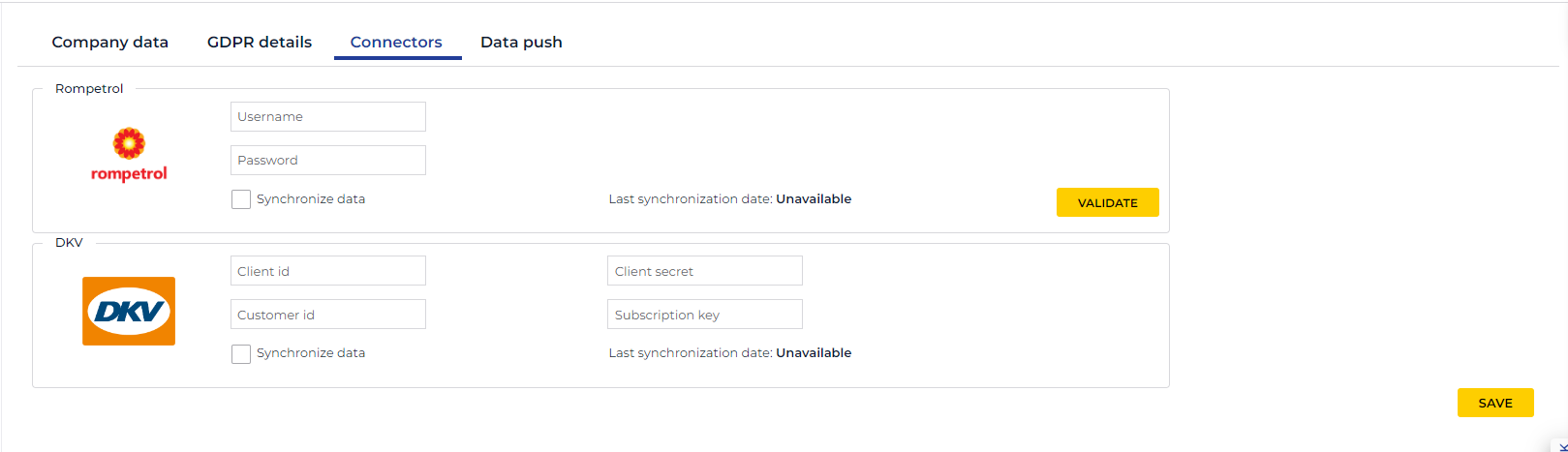
Check “Synchronize data”.
Save
If you wish to stop automatic data synchronization, uncheck the “Synchronize data” option and save.
This document outlines the steps necessary to integrate DKV data into the TrackGPS application. Please follow the instructions carefully to ensure a smooth integration.
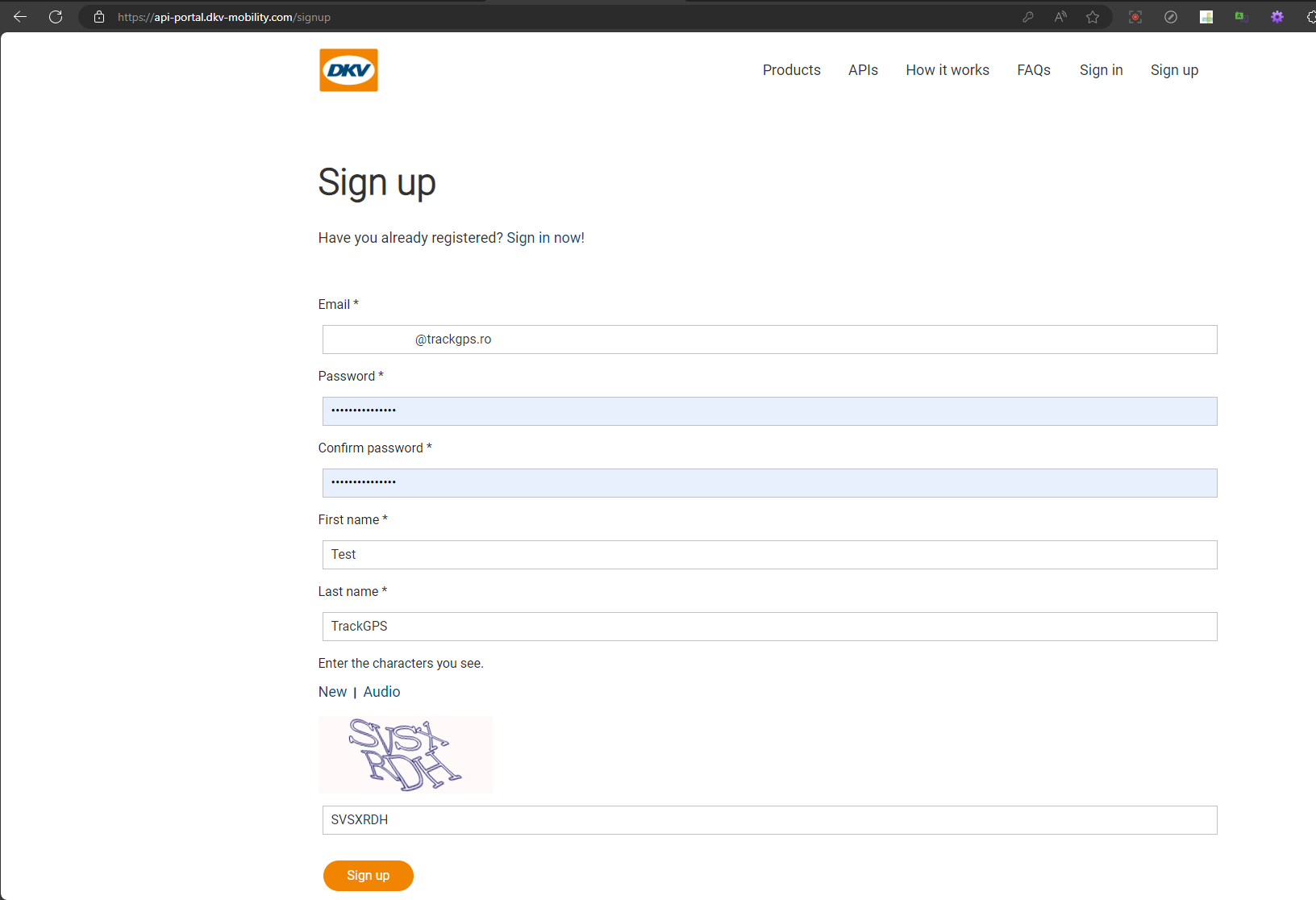
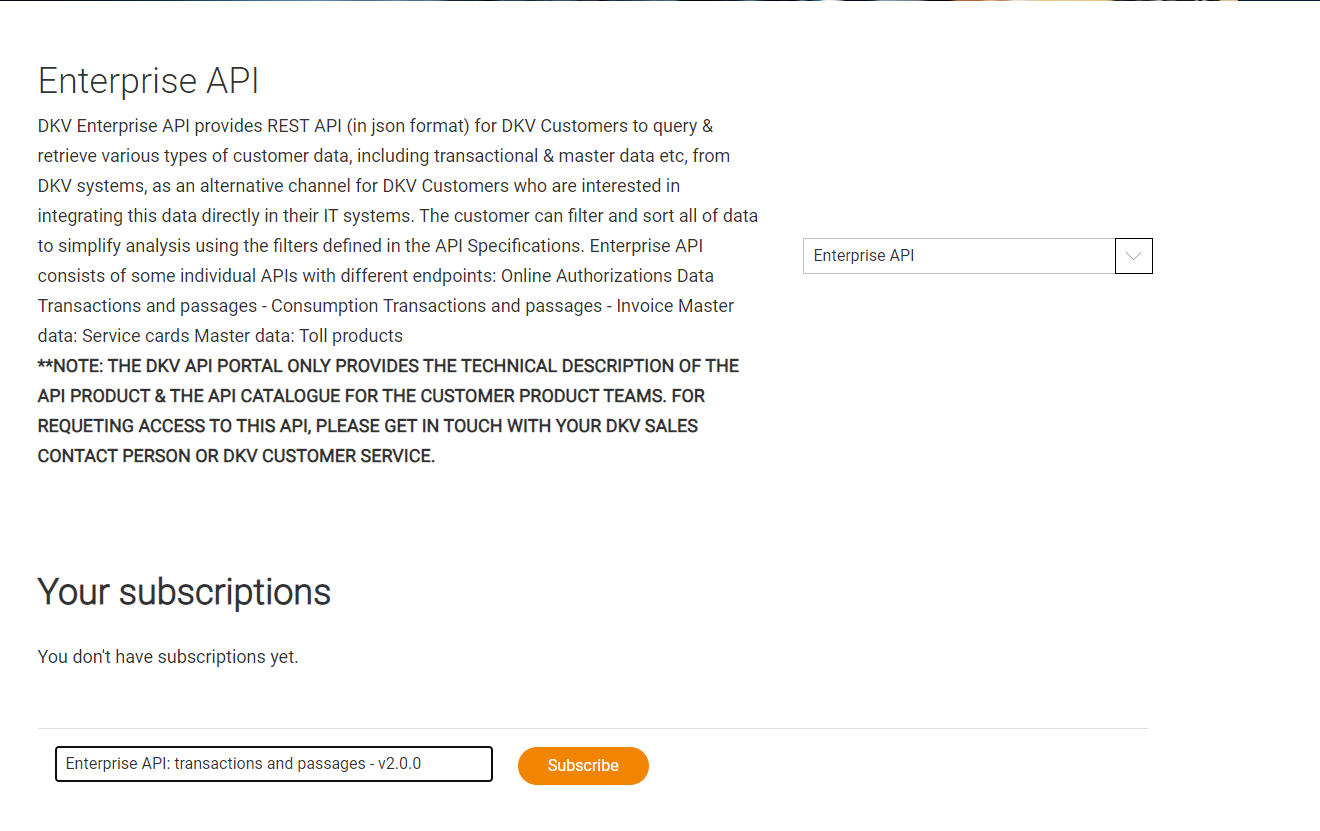
Add the obtained information in the Company Settings -> Connectors -> DKV section of the TrackGPS application.
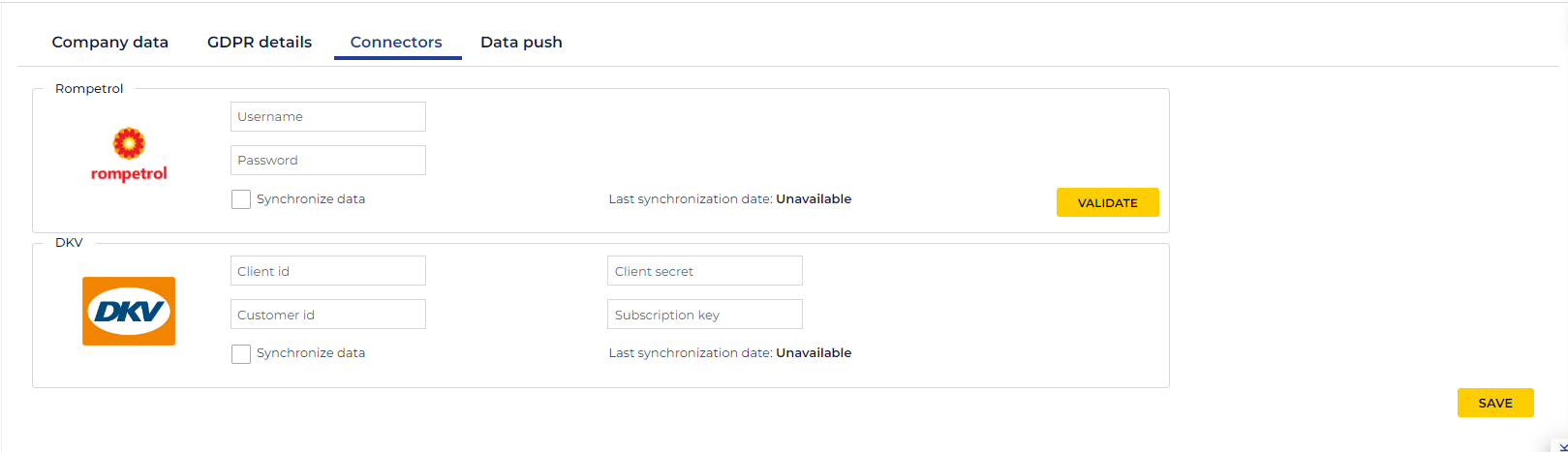
Check “Synchronize data”.
Save
If you wish to stop automatic data synchronization, uncheck the “Synchronize data” option and save.
The e-Transport functionality can be found in the “Compliance” section of the main menu.
When accessing the e-Transport functionality, a table opens with all transports that are automatically imported from the ANAF platform, as well as those manually added by the user (see the Add Transport section).
The ANAF platform is queried every 5 minutes to check for new transports or updates to existing transports, constantly updating the list of transports in the TrackGPS platform.
It is very important that the user who wants to perform the authorization has access to the digital certificate used to log in to the ANAF platform and has the digital signature installed on their computer.
The ANAF platform is queried every 5 minutes to check if there are new transports or if an existing transport has been modified, constantly updating the list of transports in the TrackGPS platform.
To authorize the ANAF platform query, please follow these steps:
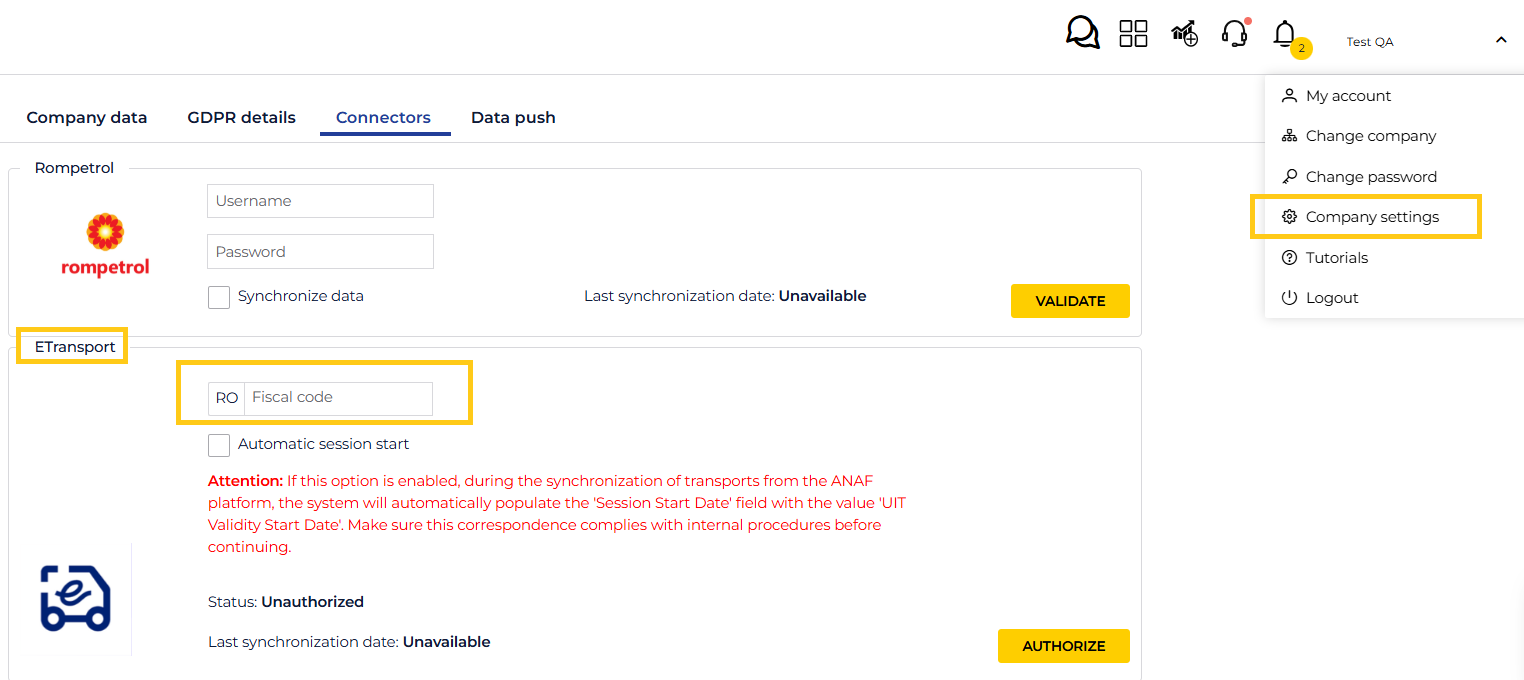
If synchronization of transports does not occur within 5 minutes, please check that the connector status is “Authorized”.
! There may also be situations where the ANAF platform is unavailable. In this case, synchronization cannot be performed. Please wait 30 minutes and, if the issue persists, contact the support team.
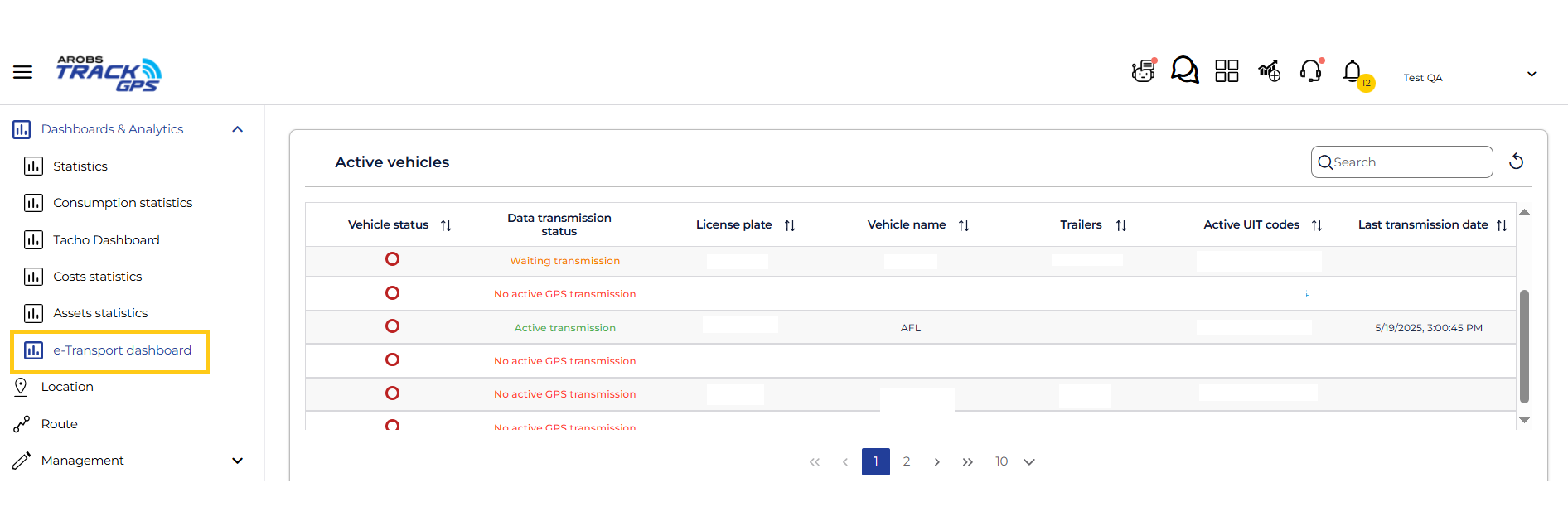
Access the “Dashboards & Analytics” menu and click on e-Transport dashboard to view the list of vehicles assigned to e-Transport shipments, as well as the list of vehicles without ongoing shipments.
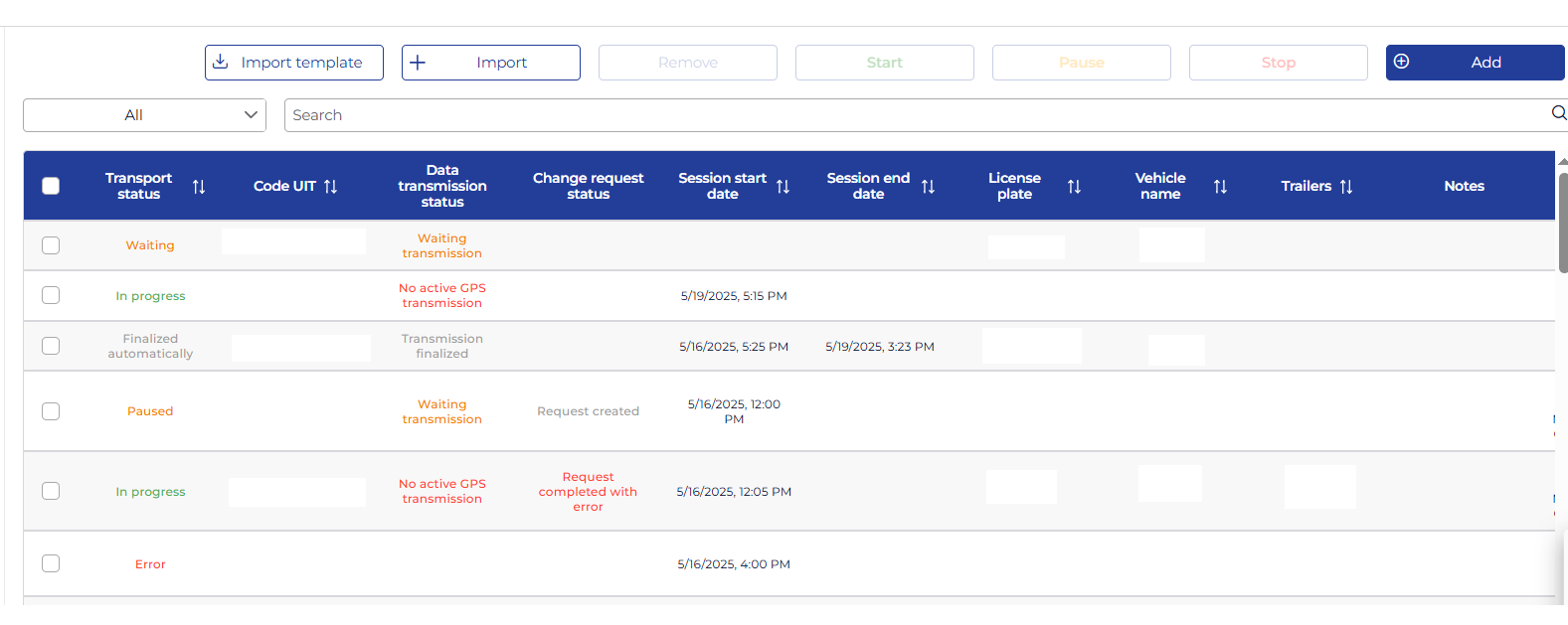
In the management section, there is a table with a list of all transports, which are automatically imported from the ANAF platform as well as those manually added by the user.
From this page, you can also add or edit a transport.
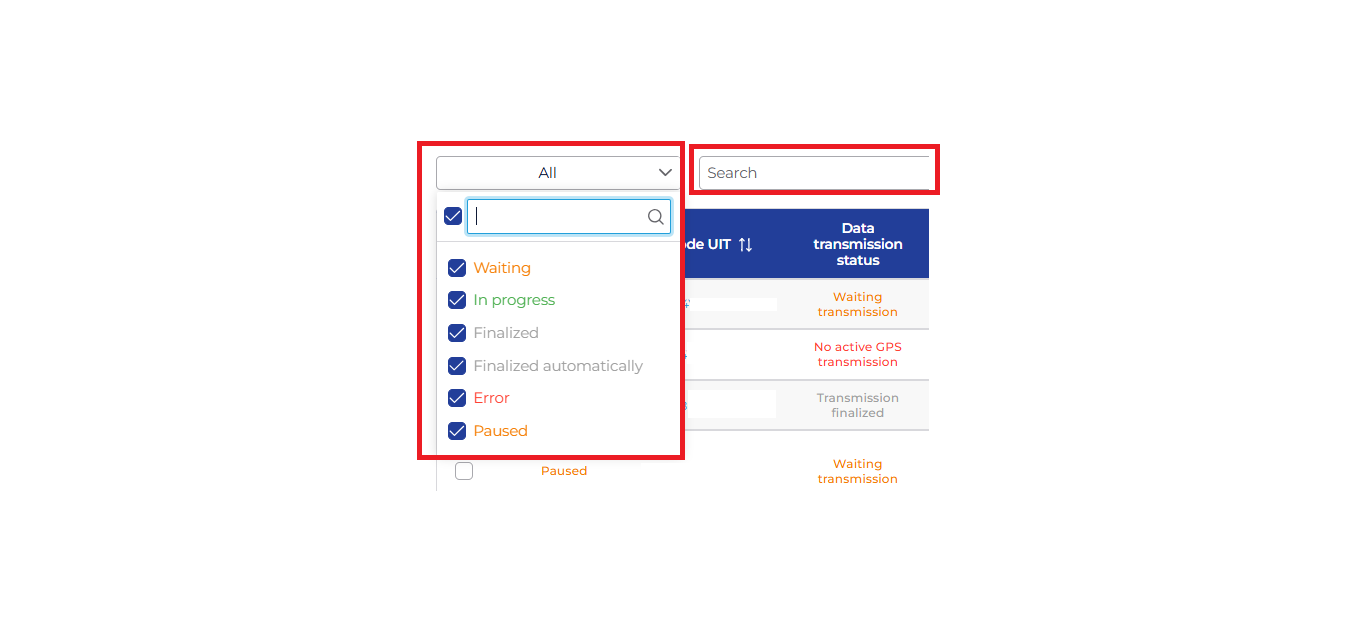
At the top of the list, there is a quicksearch menu where you can search by the fields you want to display (e.g., UIT code, license plate number, etc).
On the left side, from the drop-down list, you can filter transports based on their status.
The table contains the following columns:
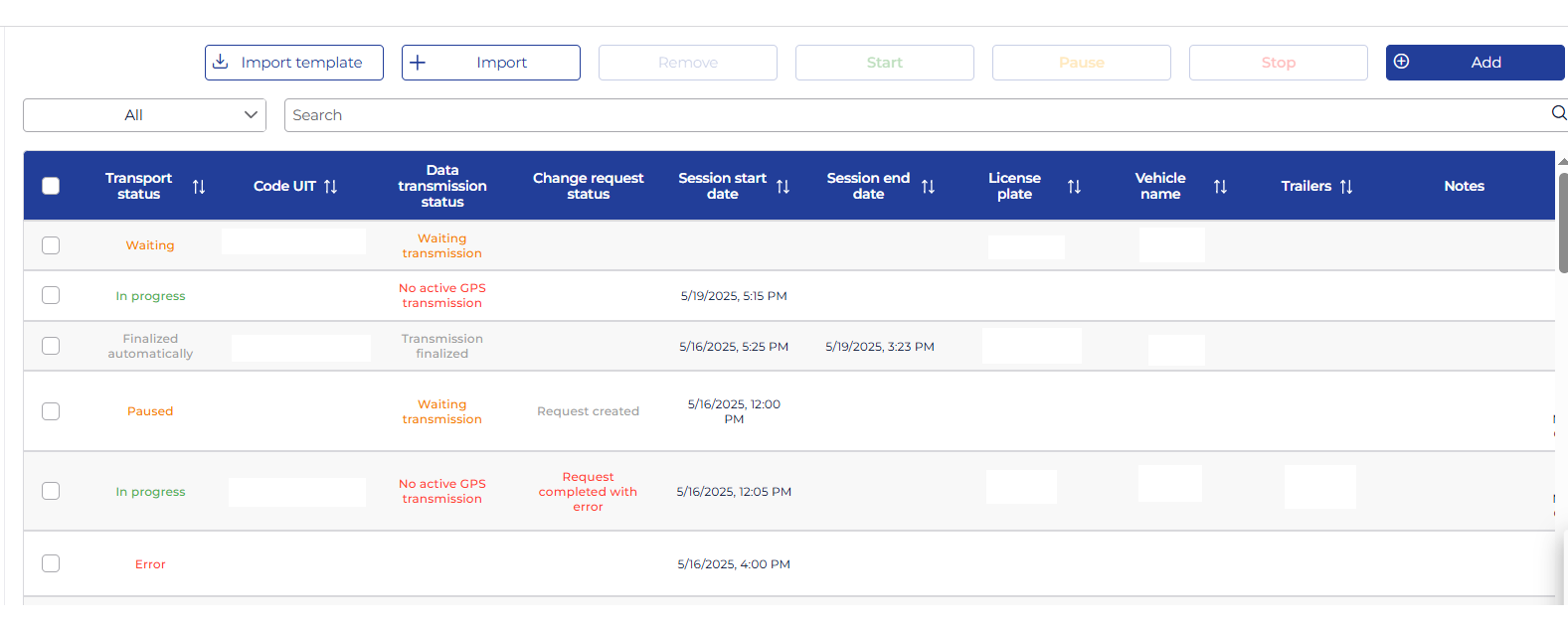
The transport list can be sorted by the following columns: Transport Status, Code UIT, Session Start Date, Session End Date, License Plate, Vehicle Name, Trailers, UIT Validity Start Date, UIT Validity End Date, Last Sync Date.
To edit a transport, click on the UIT code in the list.
Those added automatically from synchronization with the ANAF platform cannot be edited. To make changes to them, you must log in to the ANAF platform. After saving the changes in the ANAF platform, they will also be visible in the TrackGPS platform.
To add a transport manually, click the Add button in the upper right corner.
Except for transports with the status In progress, all transports in the list can be deleted. Select the desired transports by checking the checkboxes and click the Delete button in the menu at the top of the page.
You can check who performed the deletion by accessing the Administration menu, Activity History.
To add a new transport, from the management page click the Add button.
Besides the transports that appear automatically in the e-Transport menu list through authorization with the ANAF platform, you can also manually add a transport.
Click Add, and a window will open where the following fields are required:
license plate number, VAT number (automatically filled if authorized with ANAF), Code UIT, UIT validity start date,
UIT validity end date.
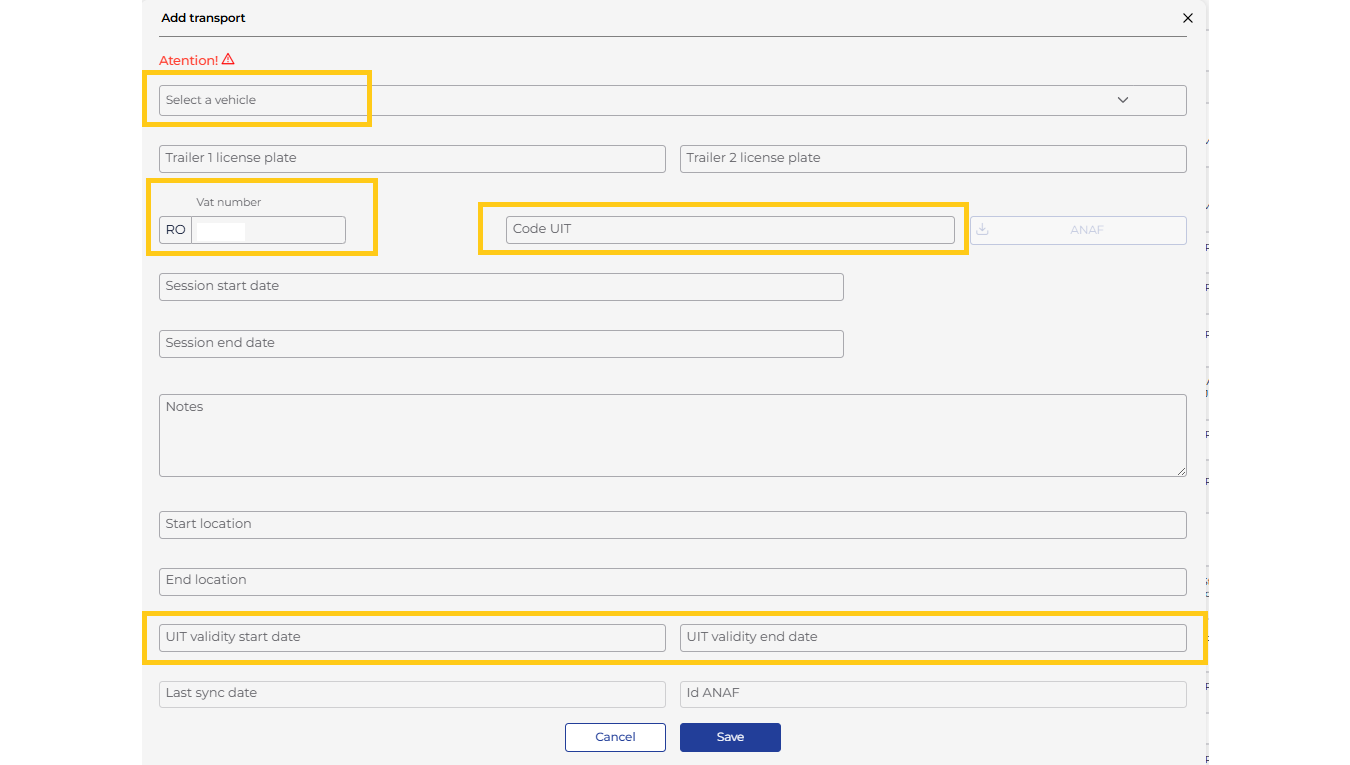
If you have the UIT code and authorization with the ANAF platform has been completed, clicking the ANAF download button will automatically fill in the fields by querying the authority’s platform.
After filling in the fields, click Save and the transport will be saved. Transports will be ordered by session start date.
Another option to add transports is by importing a file. You need to download the import template, fill in the columns with the same information, and then save it.
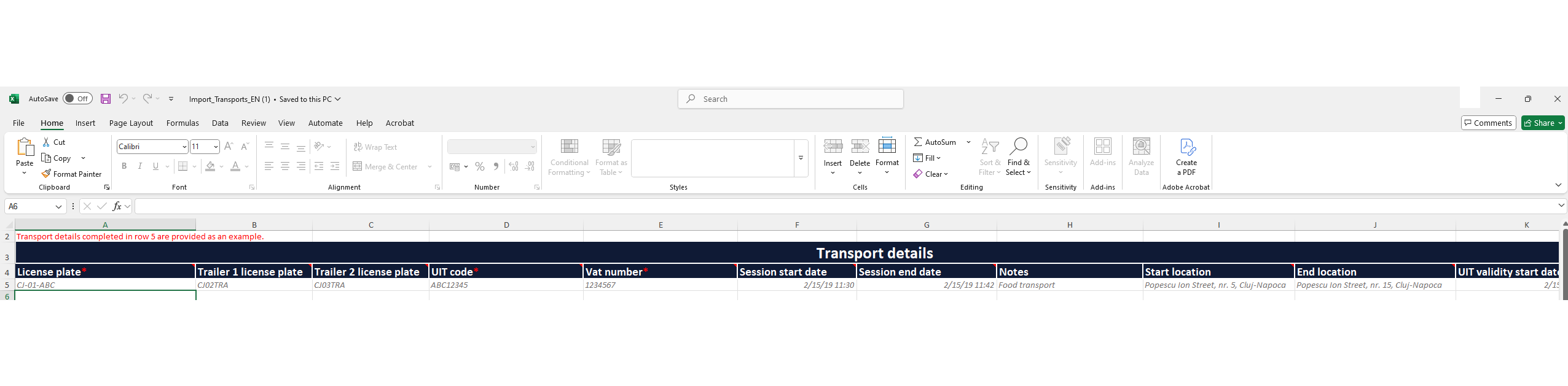
Afterwards, click “Import”, select the previously saved file, and a window with the Import Result will appear where you can check if the processing was successful.
To edit a transport, click on the UIT code of a transport from the list. This will open the transport edit form.
If the transport was added manually, all fields can be edited except for the UIT code.
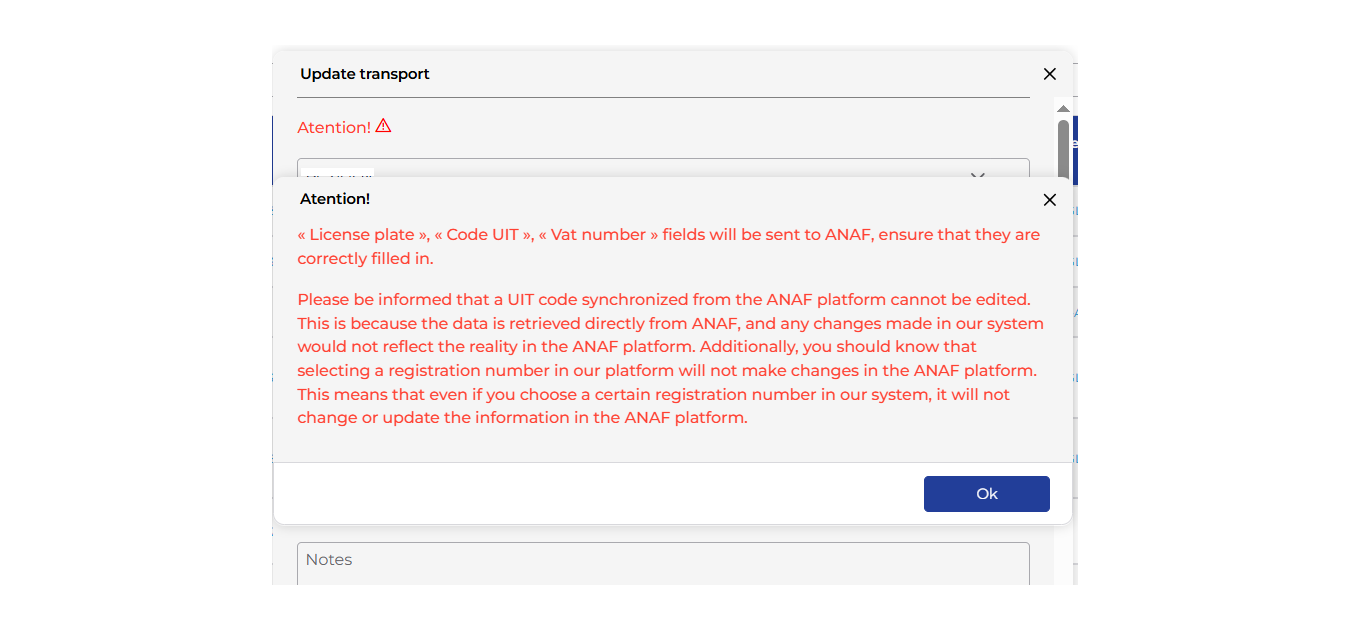
For transports added through synchronization with the ANAF platform, only the session start and end dates can be edited. Also, a transport with the status “Finalized” can no longer be edited.
In the transport edit form, a warning message is displayed to inform users that any changes made in the TrackGPS application to information retrieved directly from ANAF about a specific transport will not update the information in the ANAF platform.
Once all transports have been saved in the e-Transport module, you need to monitor their execution.
Data transmission must not be stopped later than the UIT code validity expiration date. If you forget to stop the session by pressing the Stop button, this will be done automatically by the TrackGPS platform when the UIT code validity expires, and the status will change to “Automatically finalized”.
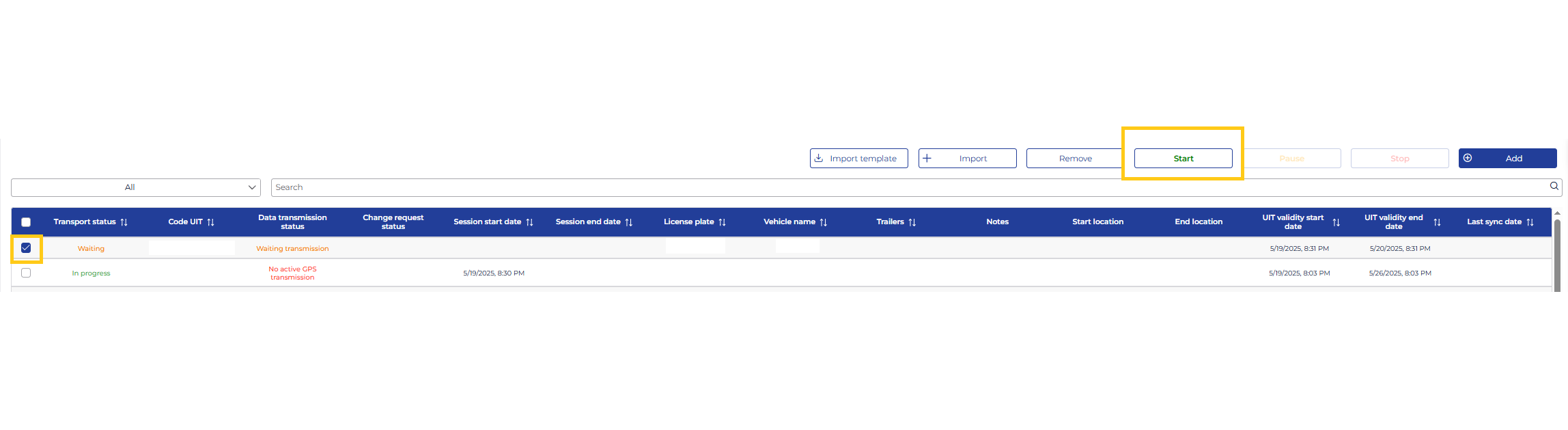
Select the desired transport by clicking on the UIT code and start the session by clicking the Start button. This step should be performed before the vehicle is leaving the starting location. Data transmission will begin immediately.
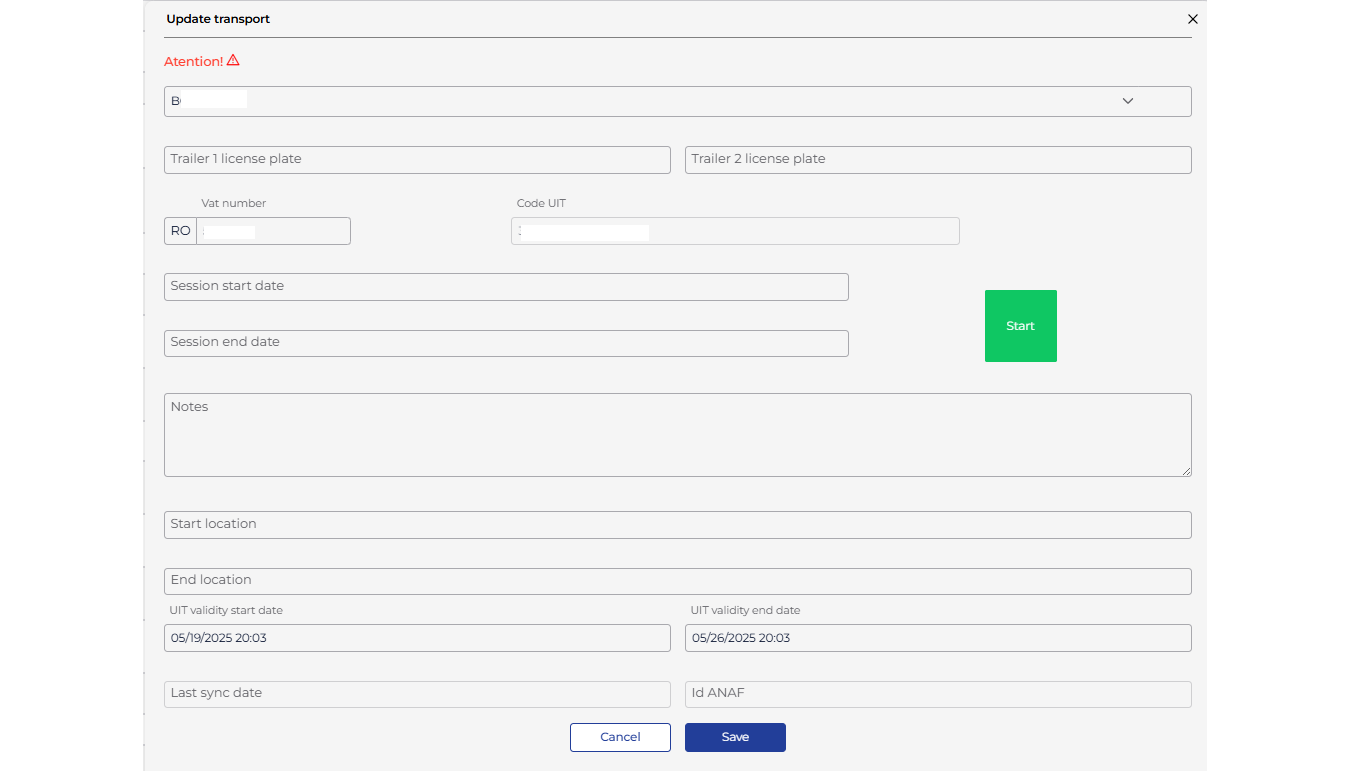
If you want to start multiple transports, you can select them by checking the checkboxes on their left and pressing the Start button from the top menu.
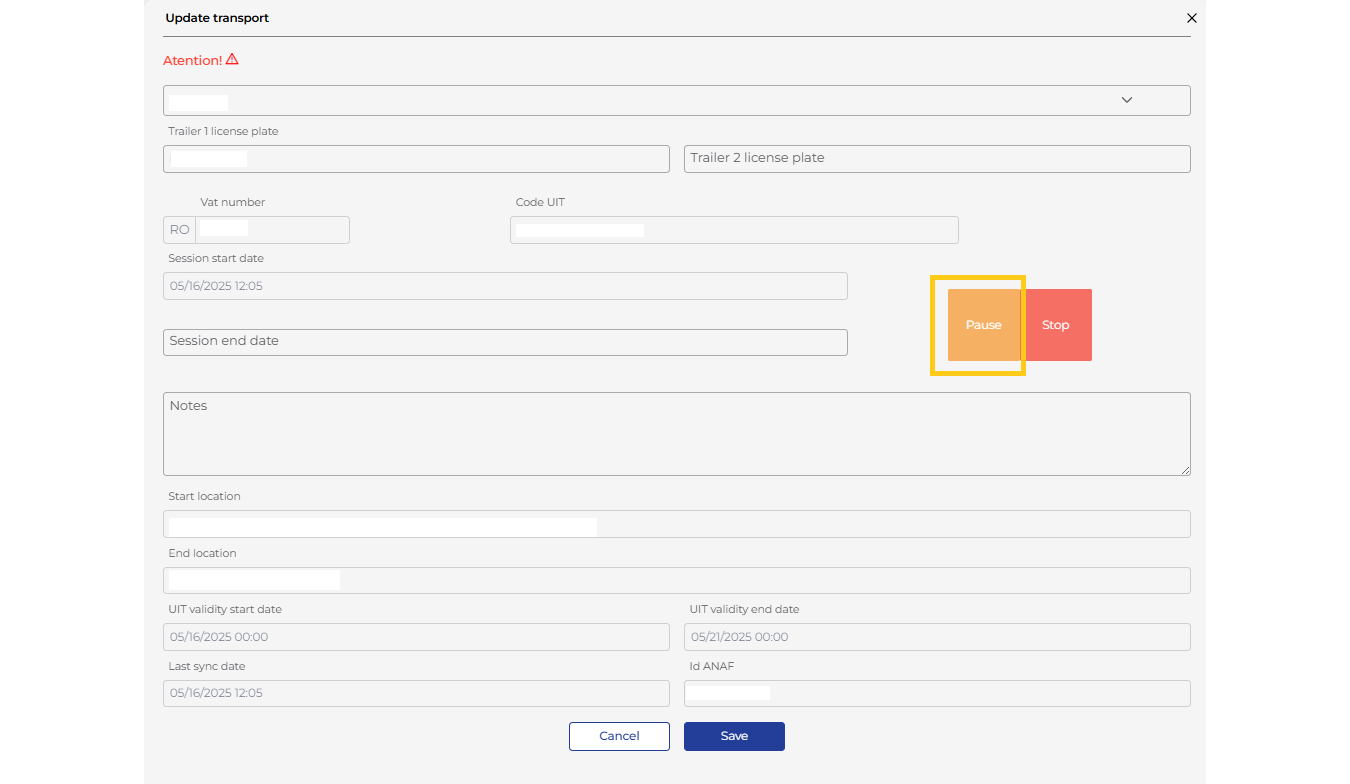
Select the desired transport by clicking on the UIT code and pause the session by clicking the Pause button. At that moment, the transport status will change to “Paused”.
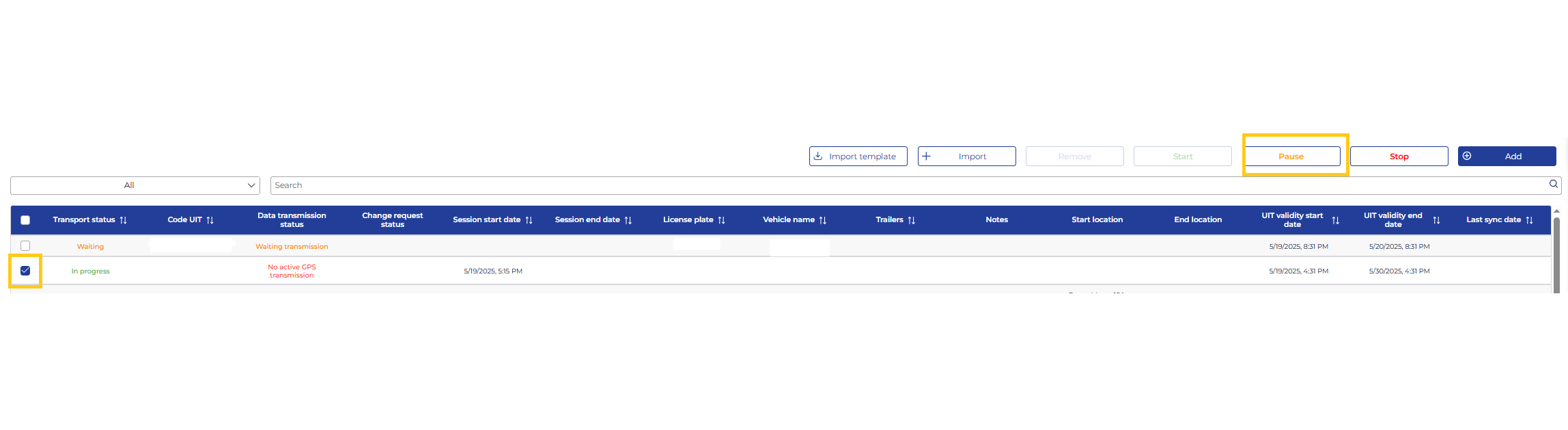
If you want to pause multiple transports, you can select them by checking the checkboxes on their left and pressing the Pause button from the top menu.
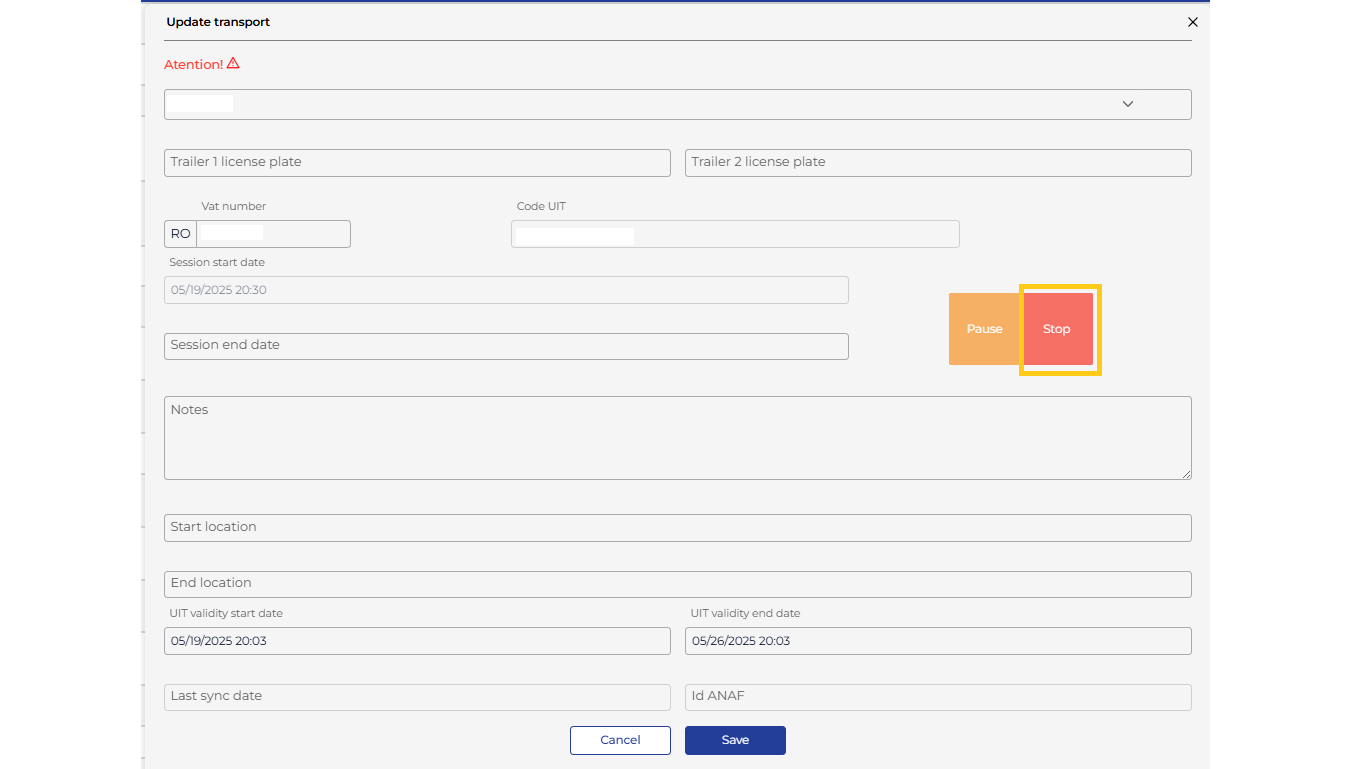
Similarly, to stop a transport, click the Stop button. At that moment, the transport status will change to “Finalized”.
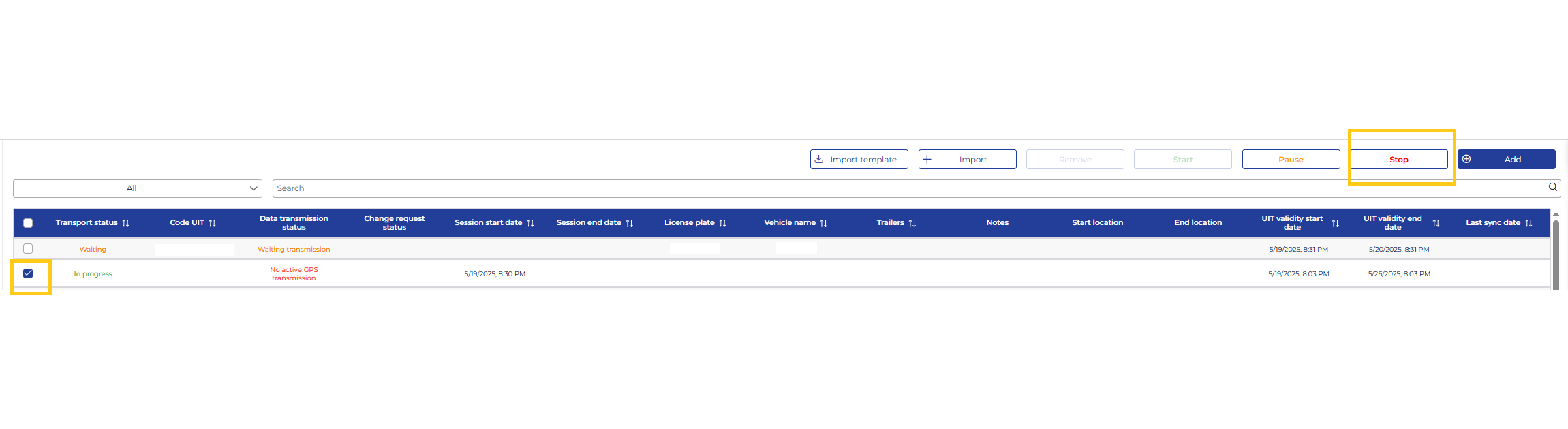
The statuses available in the TrackGPS system are listed below, along with their meanings.
| Status | Description |
|---|---|
| Pending | This status is assigned to a transport that has not yet started, either because the session start date is not set or it is scheduled for a future date. The vehicle allocated to this transport has been identified. |
| In Progress | This status is assigned to a transport that has already started, and the TrackGPS application is sending GPS data to ANAF. The transport remains in this status until it is completed. |
| Completed | This status is shown for transports that have been completed. A transport is completed when the end session date entered by the user is reached, or when the user stops data transmission by clicking the “Stop” button in the transport details form or from the transport list. Once completed, GPS data is no longer sent to ANAF. |
| Automatically Completed | Assigned to transports that reach the expiration date of the UIT code validity. When this date is reached, GPS data transmission to ANAF is automatically stopped. |
| Error | Assigned to transports for which the vehicle cannot be identified from the ANAF platform. The license plate number from the ANAF platform either does not exist in TrackGPS or is not entered correctly. Clicking this status displays a warning message regarding the vehicle that could not be identified in the TrackGPS application. |
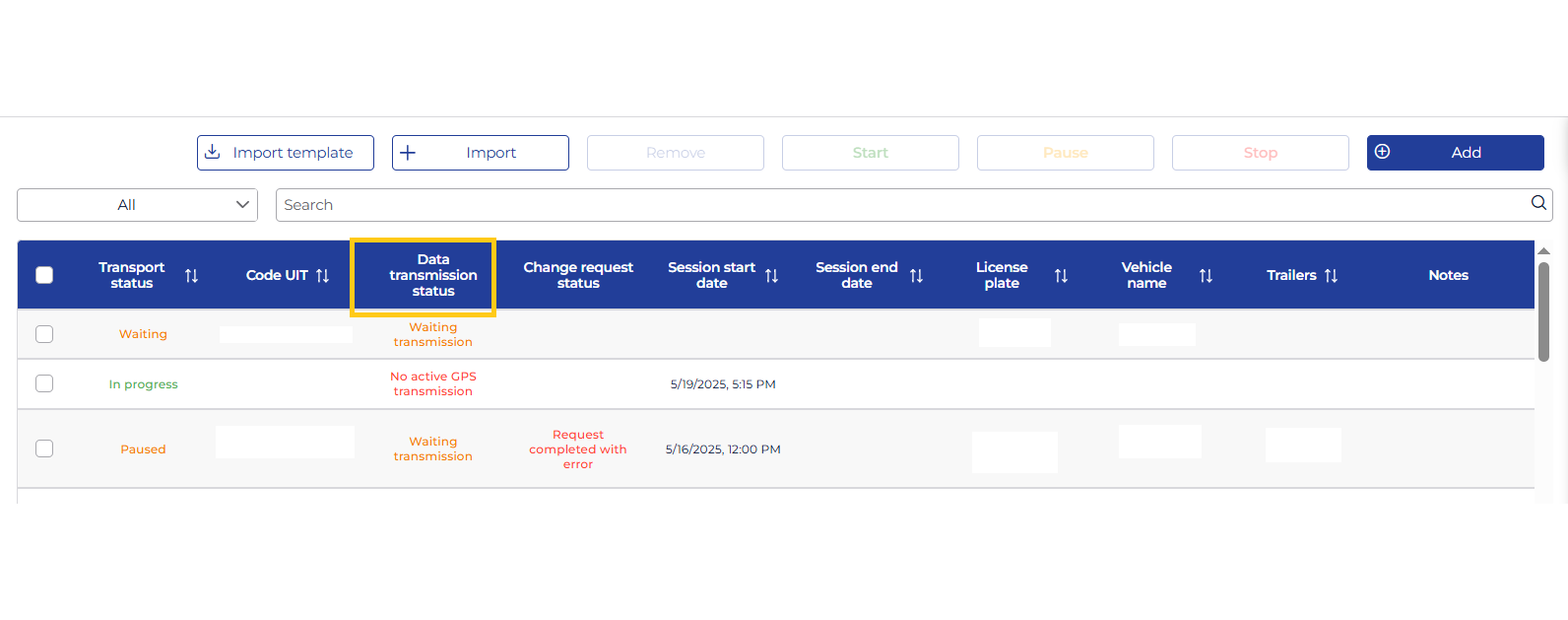
The available statuses in the TrackGPS system are listed below, along with the meaning of each.
| Status | Description |
|---|---|
| Transmission finalized | The transport is in one of the following statuses: Finalized/Finalized automatically (transport finished). |
| Waiting transmission | The transport is in one of the following statuses: Waiting (planned but not started). |
| No active GPS transmission | Appears for transports in progress but without GPS data transmission. Possible causes: - The transport has started, but the vehicle is stationary with the engine off. - A possible error in the TrackGPS system (contact support team). |
| Active transmission | Data is being successfully transmitted to ANAF. |
| Data transmission error | Data was not transmitted to ANAF due to: - Incorrect license plate number entered for manual transports. - Issues with the ANAF system receiving data. |
| Not on the territory of Romania | The vehicle has an active data session but is not in Romania. Transmission to ANAF is not required. |
| e-Transport configuration error | The vehicle is not correctly configured in TrackGPS. Contact the support team. |
| Data older than 6 Hours * | The received data is older than 6 hours and cannot be transmitted to ANAF. Possible causes: - The vehicle lost GSM signal for more than 6 hours. - GSM operator network issues. |
| No GPS signal * | The vehicle is in an area with weak or no GPS signal. Transmission to ANAF cannot be performed. |
* To avoid transmission issues, set up a notification of type “Data Transmission Interruption to ANAF” at a 30-minute interval. If errors occur, you can use the ANAF application to manually transmit location data.
When changing the vehicle registration number and/or trailer numbers for a transport imported from the ANAF platform, a data change request will be sent to ANAF. The status of this request will be displayed in the “Change Request Status” column.
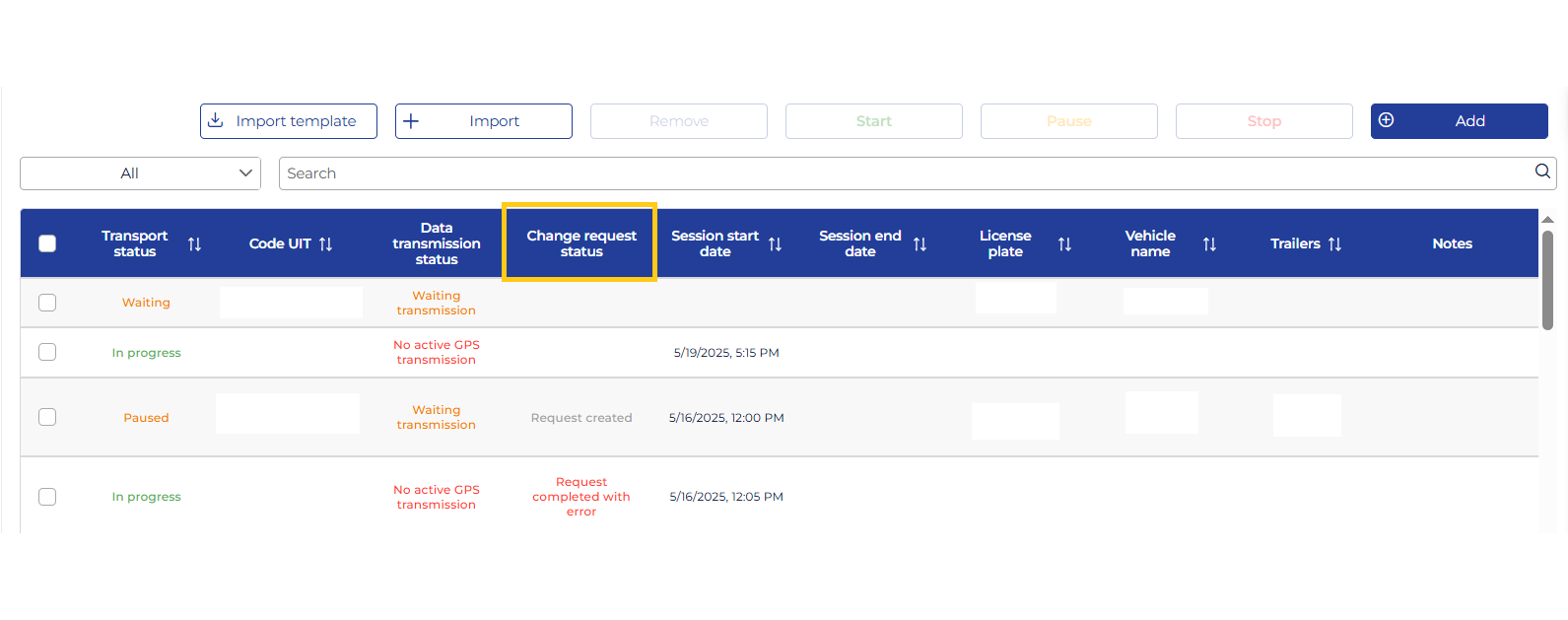
The statuses of the data change request are listed below, along with their meanings.
| Status | Description |
|---|---|
| Request Created | The transport data change request has been created and saved in the TrackGPS platform. |
| Request Successfully Sent | The transport data change request has been sent to the ANAF platform. |
| Error Sending Request | The transport data change request could not be received by the ANAF platform. |
| Request Successfully Completed | The transport data change request has been successfully processed by the ANAF platform. |
| Request Completed with Error | The transport data change request was processed with an error by the ANAF platform. |