Public API

Table of Contents

To access the methods available in the AROBS TrackGPS API, follow these steps:

  1. Access the AROBS TrackGPS application and click on “My Account”
  2. Go to “Platform Preferences”
  3. Click on the link displayed in the “API Link” field

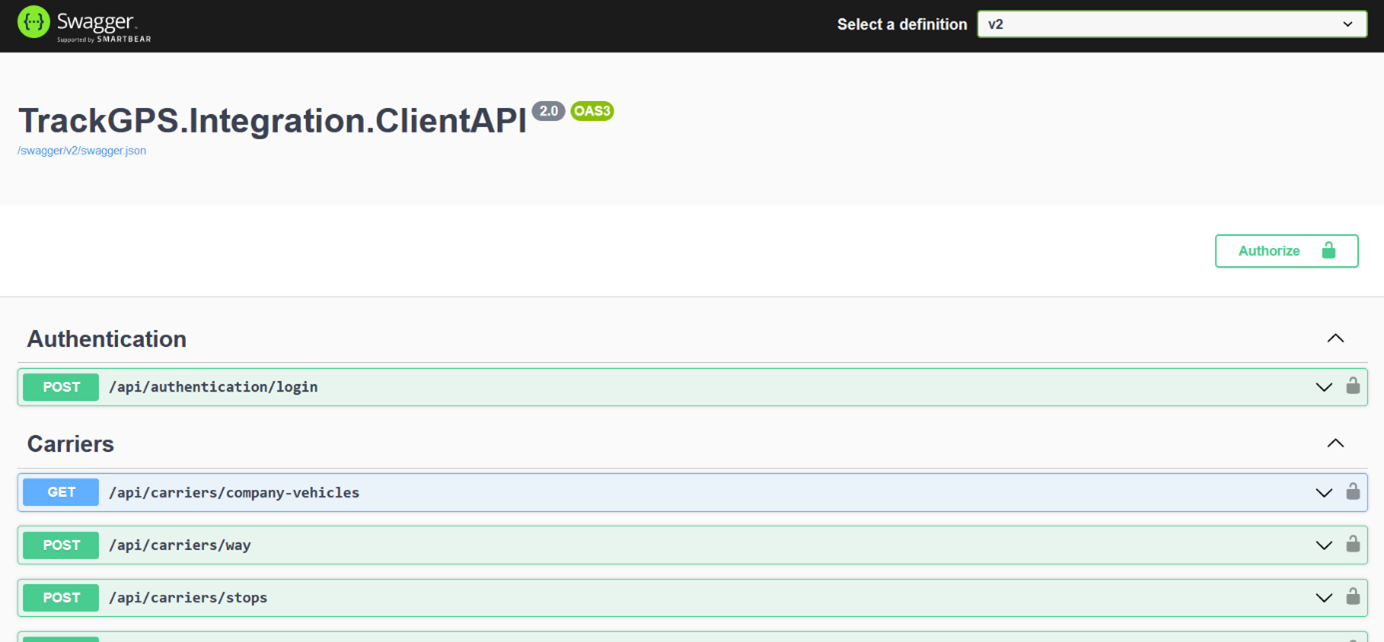
After clicking the link in the “API Link” field, a new page called Swagger will open in your browser. This page provides additional information about the available API methods.

It is important to select the “V2” version of the web service from the top right corner. The page will look like this: Swagger Swagger
Subsections of Public API

General Information

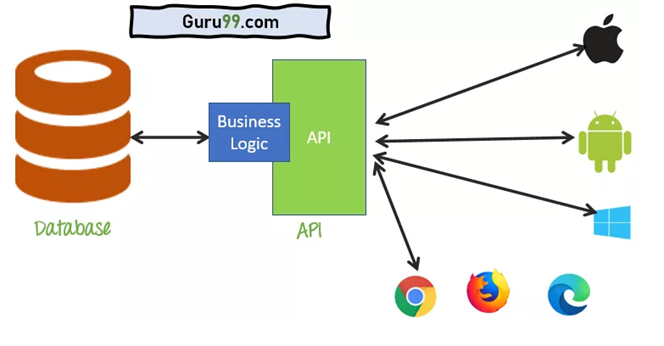
The Application Programming Interface (API) is a software interface that allows interaction between two applications without user intervention. An API is a collection of software functions and procedures. In simple terms, an API is software code that can be accessed or executed. An API is defined as code that helps two different software systems communicate and exchange data with each other.

diagram.png diagram.png

A Web API is an application programming interface that is used either for a web server or a web browser.

The API has 2 components:

  • Server Side (AROBS TrackGPS)
  • Client Side (End User)

Server Side:
The server-side web API is a programmed interface consisting of one or more publicly exposed endpoints to a defined request-response messaging system. The AROBS TrackGPS API is a RESTful API that returns information (raw data) in JSON format using specific existing methods.

Client Side:
The end user can extract raw data (using the methods mentioned above) and use it in various applications, reports, and/or functionalities.

Request Limit

Request Limit for the TrackGPS REST API

The TrackGPS REST API has a default request limit to ensure the performance and stability of the service. Currently, the limit is 1 request every 30 seconds. This means each user can send one request to the API every 30 seconds.

Exception: The login endpoint is not subject to this rate limit and can be accessed without restrictions.

Exceeding the Request Limit for the TrackGPS REST API

If the request limit of 1 request every 30 seconds is exceeded, the server will return an HTTP status code 429 (Too Many Requests). This code indicates that the user has sent too many requests in a short period.

In addition to the status code, users will also receive a specific error message.

Users are advised to wait before sending additional requests to avoid receiving this error code.

Modifying the Request Limit

In certain situations, if it is necessary to modify the request limit, please contact the support department to discuss the available options.

Create API User

To authenticate, the user must have a username and password. The login credentials for the API are not the same as the credentials for logging into the AROBS TrackGPS fleet management platform, so it is necessary to create special users for API access. API users can be created directly from the AROBS TrackGPS web platform by following the steps below:

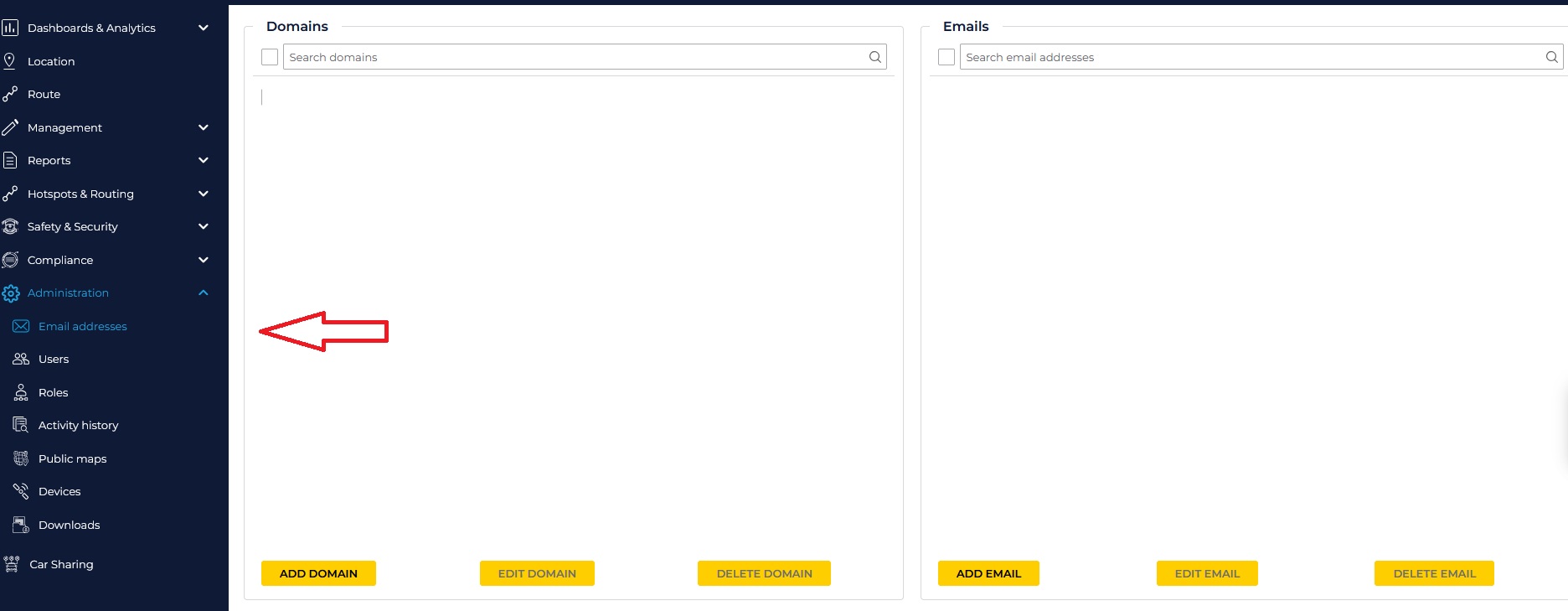
  1. Access the AROBS TrackGPS application, and from the left menu, select “Administration” and then “Email Addresses”.step1.jpg step1.jpg
  2. From the window that opens, click the “Add Email” button (in the bottom right corner of the window).step2.jpg step2.jpg
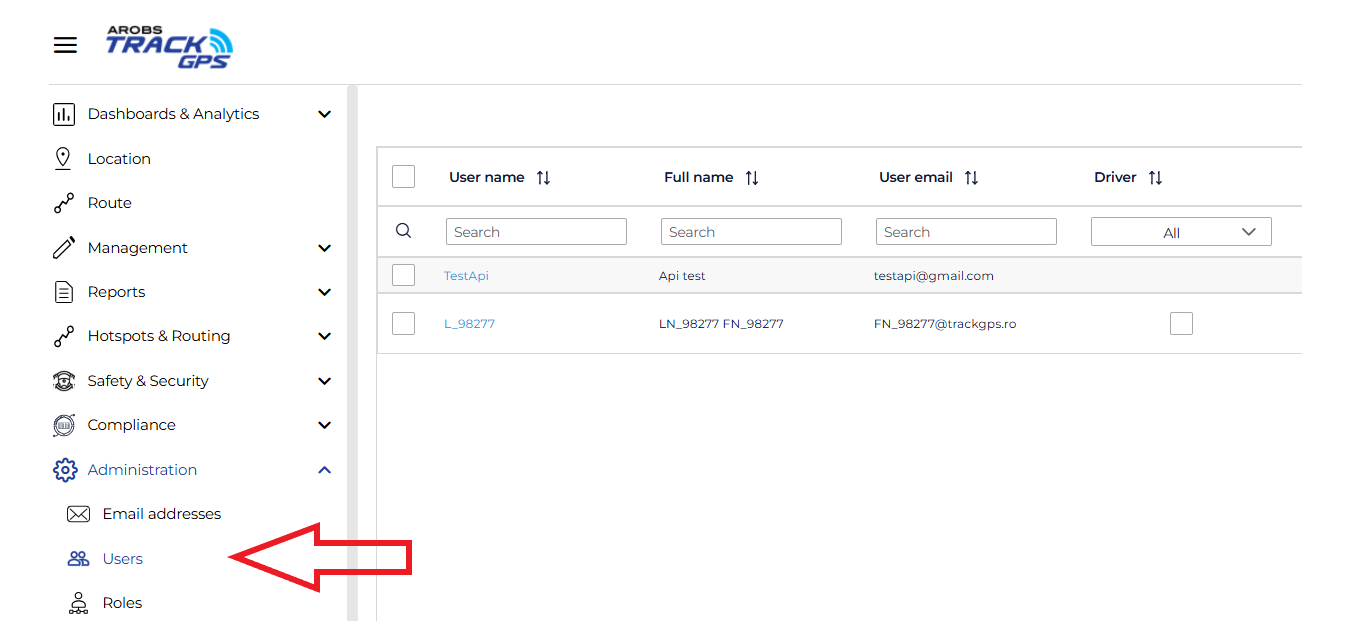
  3. Access the AROBS TrackGPS application, then from the left menu select “Administration” and then “Users” step1.png step1.png
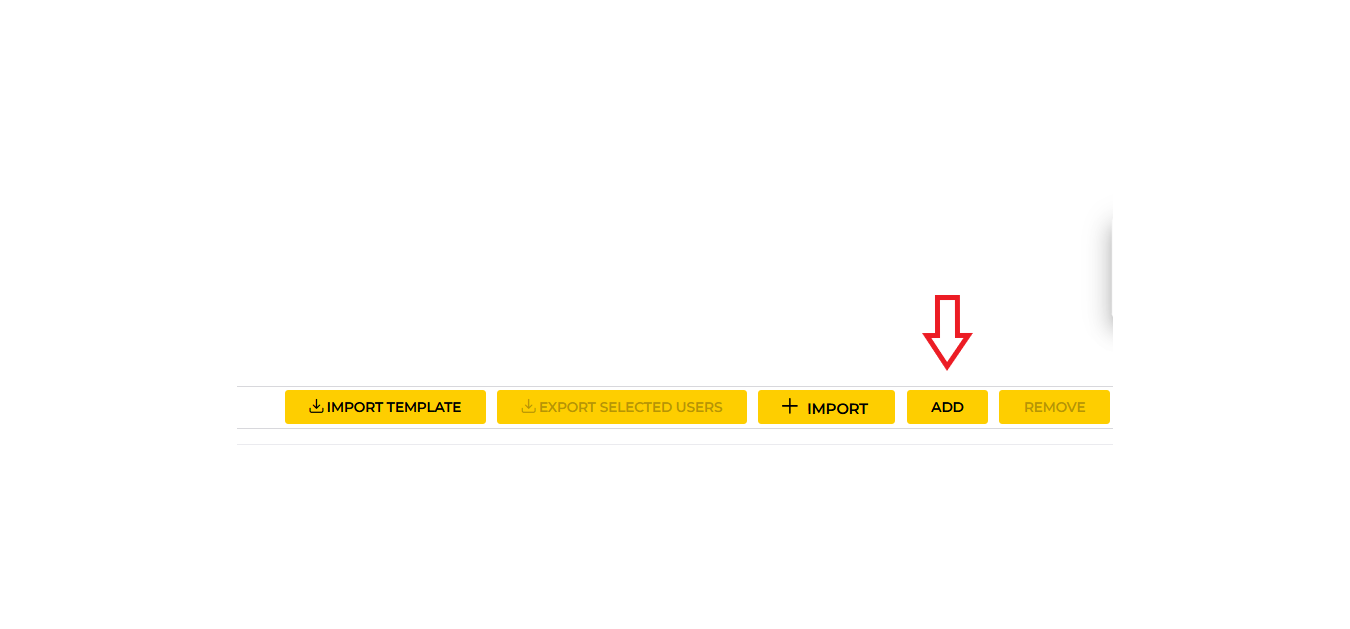
  4. In the window that opens, click the “Add” button (in the bottom right corner of the window) step2.png step2.png
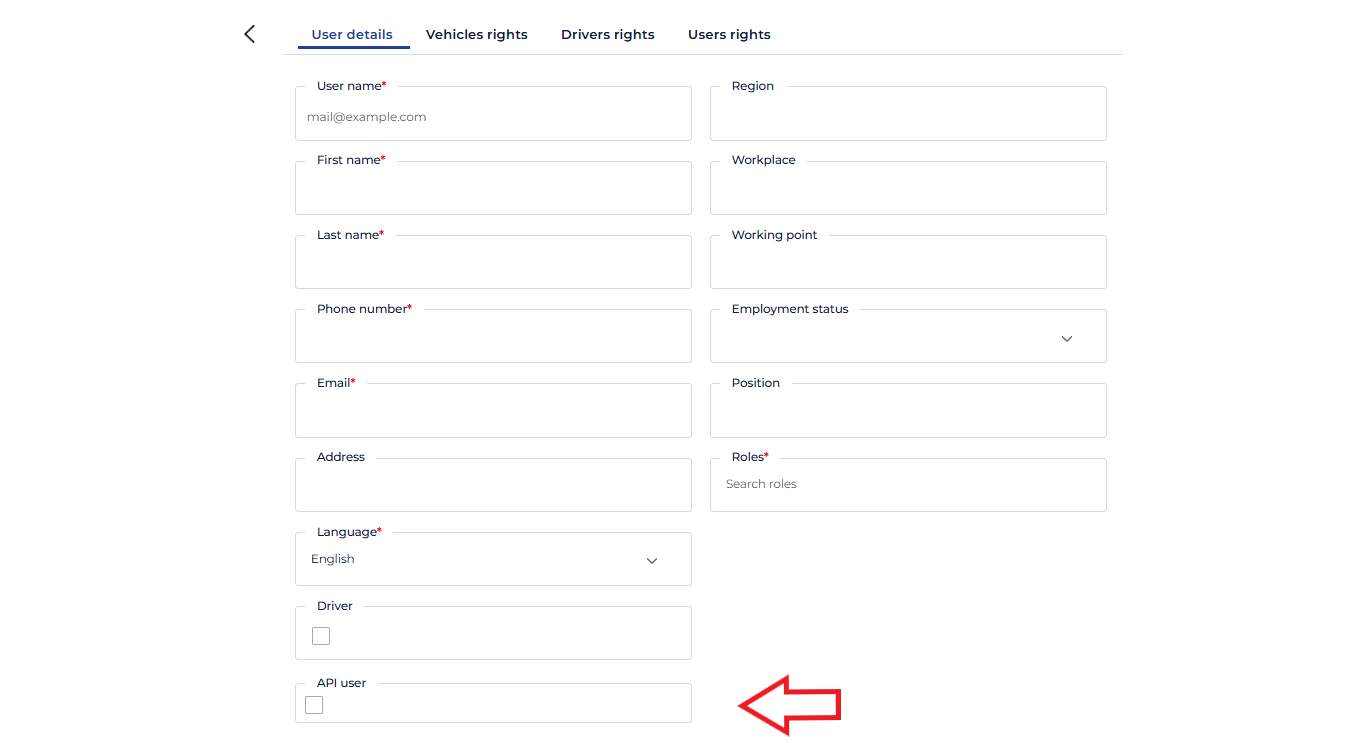
  5. After clicking the “Add” button, a new window will open where you will find the options for creating a new user. To create an API user, check the “API User” box in the User Details section, after which some options such as “Driver Rights” or “User Rights” will be hidden. Basically, in the “User Details” window, only 4 pieces of information need to be filled in: • Username – this will be the username for API authentication • First Name – used for identifying the user • Last Name – used for identifying the user • Email – the email address associated with the user, which will be used to activate the user and set the access password

Attention: This user cannot be used to log into the AROBS TrackGPS platform. Also, a user who does not have the “API User” option checked cannot be used for API data access. step3.png step3.png

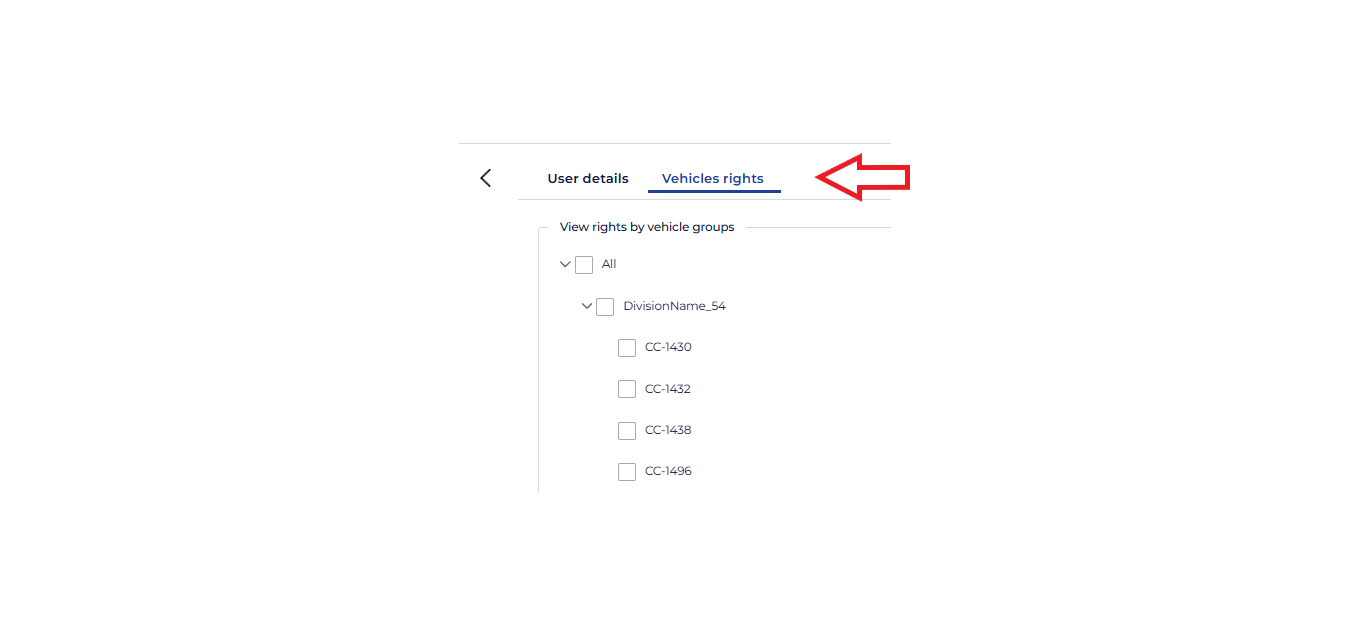
  1. After filling in the information in “User Details”, proceed to select the vehicles for which API data access is desired. The selection is made by accessing the “Vehicle Rights” option and then checking the necessary vehicles from the list, as shown in the image below: step4.png step4.png
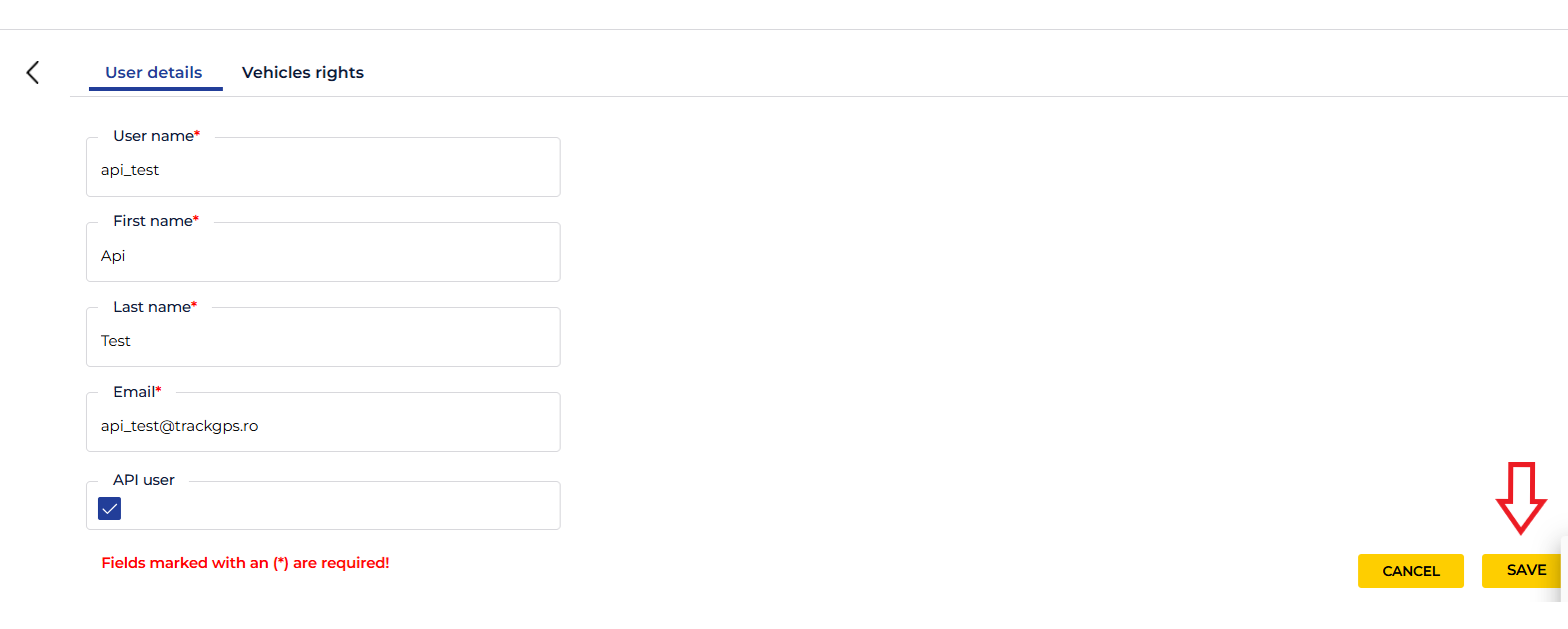
  2. Once all the necessary details are completed (user details and vehicle selection), click the “Save” button step8.png step8.png
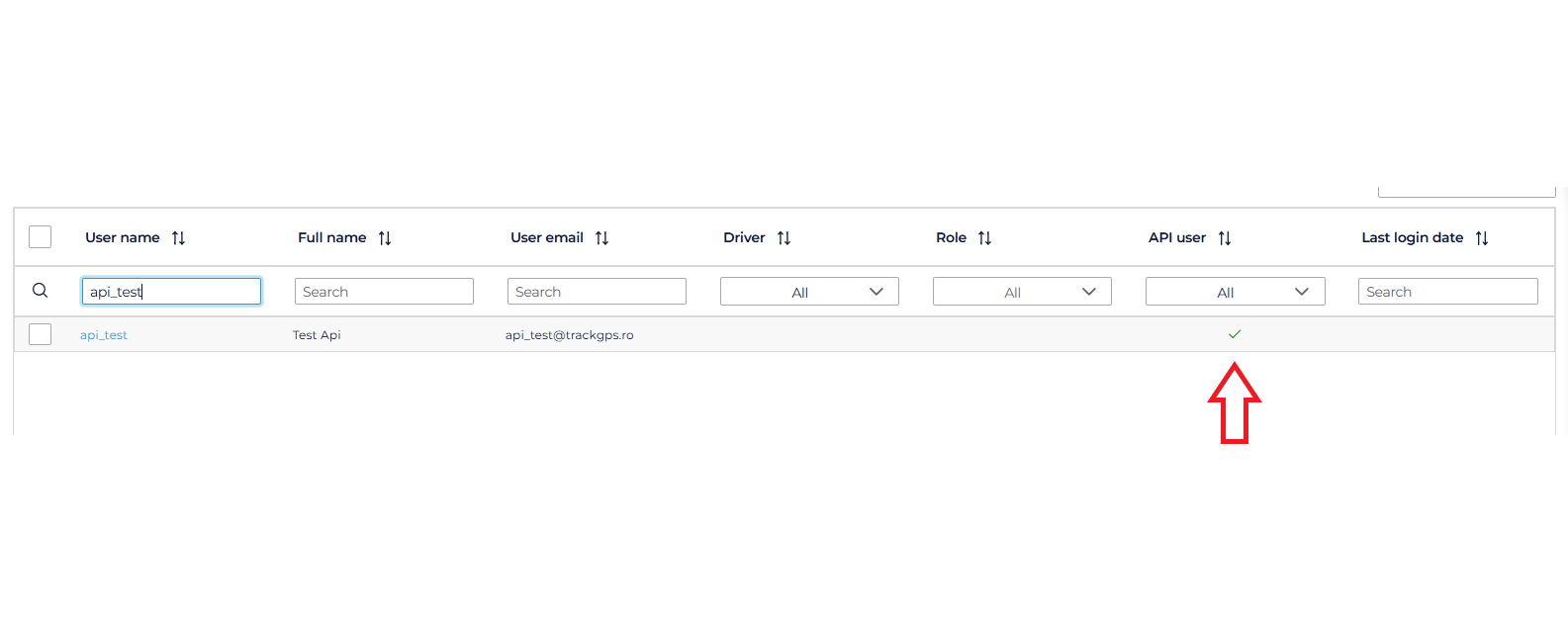
  3. As soon as the button is pressed and all the completed data is correct, the user is saved and an activation email is sent. For validation, you can check in the user list if the created user has the API user checkbox ticked. step5.png step5.png
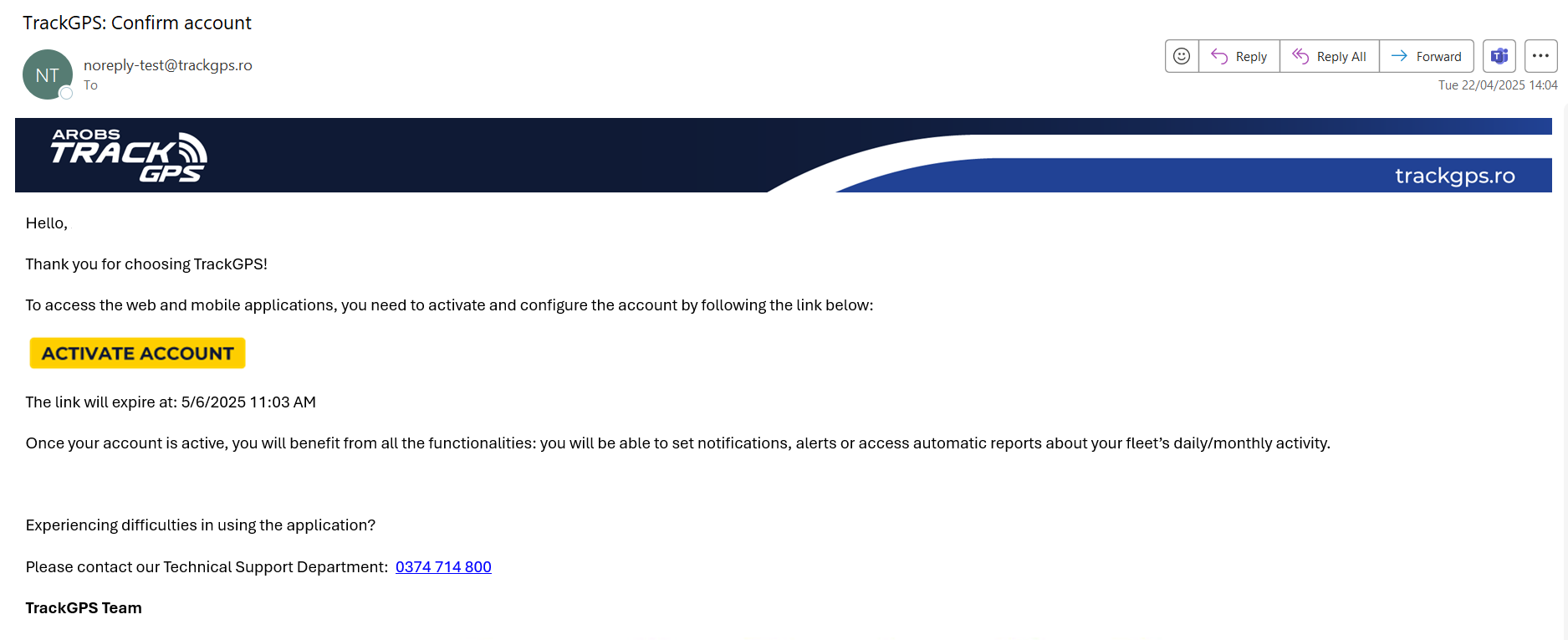
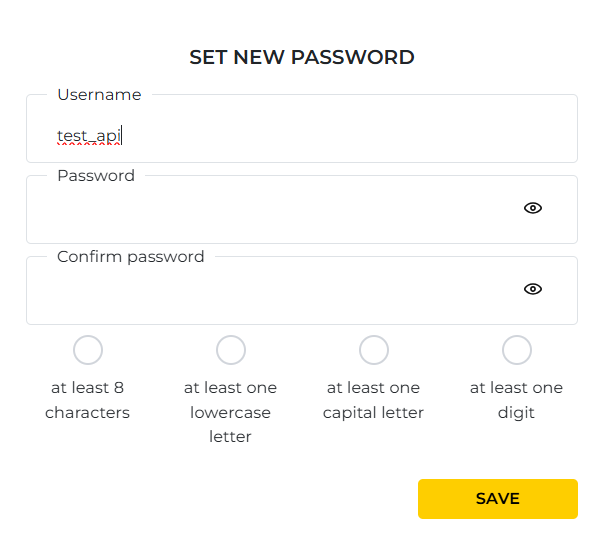
  4. After the activation email arrives at the email address associated with the user, click the “Activate account” button. step6.png step6.png Immediately after clicking the button, a password setup page will open, as shown in the image below: step7.png step7.png
  5. Enter the desired password, which must contain:
    • At least 8 characters
    • At least one lowercase letter
    • At least one digit
    • At least one uppercase letter
  6. Finally, click the “Save” button, after which the user is ready to be used for API data access.

API Methods

API Methods Documentation

Rate Limit: At least 30 seconds between two consecutive requests or according to the limit set for the user.

Authentication

Method URL Description
POST https://api.trackgps.ro/api/authentication/login?api-version=2.0 Login

Vehicles

The API allows retrieval of raw vehicle data through the following endpoints:

Method URL Description
GET https://api.trackgps.ro/api/carriers/company-vehicles?api-version=2.0 List vehicles
POST https://api.trackgps.ro/api/carriers/way?api-version=2.0 Vehicle ways
POST https://api.trackgps.ro/api/carriers/stops?api-version=2.0 Stops
POST https://api.trackgps.ro/api/carriers/consumption?api-version=2.0 Fuel consumption
POST https://api.trackgps.ro/api/carriers/refills?api-version=2.0 Refueling data
POST https://api.trackgps.ro/api/carriers/temperatures?api-version=2.0 Temperature data

e-Transport

The API allows management of transports in the company account through the following endpoints:

Method URL Description
POST https://api.trackgps.ro/api/eTransport/add-transport?api-version=2.0 Add transport
POST https://api.trackgps.ro/api/eTransport/update-transport?api-version=2.0 Update transport
POST https://api.trackgps.ro/api/eTransport/load-transports?api-version=2.0 List transports
POST https://api.trackgps.ro/api/eTransport/remove-transports?api-version=2.0 Remove transports
POST https://api.trackgps.ro/api/eTransport/start-transports?api-version=2.0 Start transports
POST https://api.trackgps.ro/api/eTransport/end-transports?api-version=2.0 End transports
POST https://api.trackgps.ro/api/eTransport/pause-transports?api-version=2.0 Pause transports

Subsections of API Methods

Authentication

After obtaining the API credentials (username and password), use the login endpoint to generate an authentication token valid for 1 hour. This authentication token is required to extract raw data using the other endpoints.

A new token must be generated every hour to continue extracting raw data from the AROBS TrackGPS system.

Subsections of Authentication

Login

General Description

The login endpoint is used for authenticating users within the API.
It receives a username and password in the request body, and if the authentication is valid, it returns an access token (JWT) along with a refresh token.
These tokens must be used to authorize requests to protected API resources.

⚠️ All requests to this endpoint must include the api-version=2.0 parameter in the URL.
URL: POST https://api.trackgps.ro/api/authentication/login?api-version=2.0

Request Parameters

Requests to this endpoint must be of type POST and include:

  • Query parameter:

    • api-version: the API version. Recommended value: 2.0.
  • The payload must be sent in the request body as form data with the following structure:

{
  "username": "user@example.com",
  "password": "SecretPassword123"
}

Property Descriptions

  • username: The username or email address used for authentication.
  • password: The password associated with the account.

Response Structure

A successful response (HTTP 200) will have the following format:

{
    "access_token": "eyJhbGciOavJZdtmkv3s9OW4ljE2V225_uTkntrDo-SDYwFGgYLbpQ",
    "expires_in": 28800,
    "token_type": "Bearer",
    "refresh_token": "8E65181908146821C79E26259683DF6F-1",
    "scope": "CarPoolingAPI IdentityServerApi offline_access openid profile TrackGPSV4Api"
}

Property Descriptions

  • access_token: The JWT token used to authorize subsequent API requests.
  • expires_in: The token’s validity duration (in seconds).
  • token_type: The type of token, generally “Bearer”.
  • refresh_token: Token that can be used to refresh the session without re-authentication.
  • scope: List of permissions associated with the token.

Error Responses

  • 400 Bad Request – Missing parameters or incorrect request structure.
  • 401 Unauthorized – Invalid credentials or inactive user.
  • 429 Too Many Requests – Rate limit exceeded for the current user.

Vehicles

At this time, the API provided by AROBS TrackGPS allows the use of 5 endpoints to obtain raw data:

Method URL Description
GET https://api.trackgps.ro/api/carriers/company-vehicles?api-version=2.0 List vehicles
POST https://api.trackgps.ro/api/carriers/way?api-version=2.0 Vehicle ways
POST https://api.trackgps.ro/api/carriers/stops?api-version=2.0 Stops
POST https://api.trackgps.ro/api/carriers/consumption?api-version=2.0 Fuel consumption
POST https://api.trackgps.ro/api/carriers/refills?api-version=2.0 Refueling data
POST https://api.trackgps.ro/api/carriers/temperatures?api-version=2.0 Temperature data

The minimum interval between two successive requests can be 30 seconds.

Subsections of Vehicles

Company Vehicles

General Description

The CompanyVehicles method returns the list of vehicles and their details. It only returns vehicles to which the user has access.
From the response of this method, you can retrieve the vehicleId values, which can be used in subsequent API calls.

This method is subject to Rate Limit restrictions.

⚠️ All requests to this endpoint must include the api-version=2.0 parameter in the URL.
URL: GET https://api.trackgps.ro/api/carriers/company-vehicles?api-version=2.0

⚠️ Note: All date and time values sent or returned by this endpoint are in the company’s local time zone.


Response Structure

{
  "payload": [
    {
      "vehicleId": 0,
      "vehicleUId": "3fa85f64-5717-4562-b3fc-2c963f66afa6",
      "vehicleName": "string",
      "vehicleRegistrationNumber": "string",
      "latitude": 0,
      "longitude": 0,
      "gpsDate": "2024-09-09T08:52:55.005",
      "address": "string",
      "speed": 0,
      "course": 0,
      "engineEvent": 0,
      "engineRpm": 0,
      "engineEventDate": "2024-09-09T08:52:55.005",
      "serverDate": "2024-09-09T08:52:55.005",
      "isPrivate": true,
      "vehicleIdentificationNumber": "string",
      "externalPowerVoltage": 0,
      "vehicleManufacturer": "string",
      "vehicleModel": "string",
      "manufactureYear": 0
    }
  ],
  "correlationId": "3fa85f64-5717-4562-b3fc-2c963f66afa6",
  "failureReasons": [
    {
      "errorCode": "string",
      "errorParameters": [
        "string"
      ]
    }
  ],
  "isSuccess": true
}

Property Descriptions

  • payload: List of vehicles and their details.
    • vehicleId: Unique ID of the vehicle.
    • vehicleUId: Universal unique ID of the vehicle.
    • vehicleName: Name of the vehicle.
    • vehicleRegistrationNumber: Vehicle registration number.
    • latitude: Latitude of the vehicle’s location.
    • longitude: Longitude of the vehicle’s location.
    • gpsDate: Date and time of the last GPS update.
    • address: Address of the vehicle’s location.
    • speed: Vehicle speed.
    • course: Vehicle travel direction.
    • engineEvent: Engine event.
    • engineRpm: Engine RPM.
    • engineEventDate: Date and time of the engine event.
    • serverDate: Server date and time at the moment of response.
    • isPrivate: Indicates if the vehicle is in private mode.
    • vehicleIdentificationNumber: Vehicle Identification Number (VIN).
    • externalPowerVoltage: Power supply voltage.
    • vehicleManufacturer: Vehicle manufacturer.
    • vehicleModel: Vehicle model.
    • manufactureYear: Vehicle manufacture year.
  • correlationId: Unique ID for correlating the request and response.
  • failureReasons: List of failure reasons, if any.
    • errorCode: Error code.
    • errorParameters: Additional error parameters.
  • isSuccess: Indicates if the request was processed successfully.

Way

General Description

The Way method returns the list of vehicle locations for the period provided as a parameter. It only returns vehicles to which the user has access. The method accepts as parameters a list of up to 10 vehicleId values and a period of up to 31 days.

It is subject to the restrictions described in Rate Limit

⚠️ All requests to this endpoint must include the api-version=2.0 parameter in the URL.
URL: POST https://api.trackgps.ro/api/carriers/way?api-version=2.0

⚠️ Note: All date and time values sent or returned by this endpoint are in the company’s local time zone.


Request Parameters

{
  "vehiclesList": [
    0
  ],
  "startDate": "2024-09-09T09:21:50.133Z",
  "endDate": "2024-09-09T09:21:50.133Z"
}
  • vehiclesList: List of vehicleId values for which you want to obtain locations.
  • startDate: Start date and time of the period for which locations are requested.
  • endDate: End date and time of the period for which locations are requested.

Response Structure

{
  "payload": [
    {
      "vehicleId": 0,
      "gpsDate": "2024-09-09T09:21:50.134",
      "latitude": 0,
      "longitude": 0,
      "speed": 0,
      "course": 0
    }
  ],
  "correlationId": "3fa85f64-5717-4562-b3fc-2c963f66afa6",
  "failureReasons": [
    {
      "errorCode": "string",
      "errorParameters": [
        "string"
      ]
    }
  ],
  "isSuccess": true
}

Property Descriptions

  • payload: List of vehicle locations.
    • vehicleId: Unique ID of the vehicle.
    • gpsDate: Date and time of the last GPS update.
    • latitude: Latitude of the vehicle’s location.
    • longitude: Longitude of the vehicle’s location.
    • speed: Speed of the vehicle.
    • course: Direction of vehicle movement.
  • correlationId: Unique ID for correlating the request and response.
  • failureReasons: List of failure reasons, if any.
    • errorCode: Error code.
    • errorParameters: Additional parameters for the error.
  • isSuccess: Indicator if the request was processed successfully.

Stops

General Description

The Stops method returns a list of vehicle stops within the requested period. It only returns data for vehicles the user has access to. If the list contains at least one vehicle the user does not have access to, a response with error code 401 will be returned.

It is subject to the Rate Limit restrictions.

⚠️ All requests to this endpoint must include the api-version=2.0 parameter in the URL.
URL: POST https://api.trackgps.ro/api/carriers/stops?api-version=2.0

⚠️ Note: All date and time values sent or returned by this endpoint are in the company’s local time zone.


Request Parameters

{
  "vehiclesList": [
    0
  ],
  "startDate": "2024-09-09T09:49:19.549",
  "endDate": "2024-09-09T09:49:19.549",
  "stationaryMargin": 0
}
  • vehiclesList: List of vehicle IDs for which stops are requested (maximum 10 vehicles).
  • startDate: Start date and time of the period for which stops are requested.
  • endDate: End date and time of the period for which stops are requested.
  • stationaryMargin: Stop duration in minutes (cannot be less than 1 minute).

Response Structure

{
  "payload": [
    {
      "results": {
        "additionalProp1": [
          {
            "vehicleId": 0,
            "startDate": "2025-04-11T14:33:30.175",
            "endDate": "2025-04-11T14:33:30.175",
            "latitude": 0,
            "longitude": 0,
            "stationaryEngineOnTime": 0,
            "distance": 0,
            "maxSpeed": 0,
            "averageSpeed": 0,
            "speedCount": 0,
            "indexKm": 0,
            "indexHours": 0,
            "address": "string",
            "stopDuration": 0,
            "engineOnStops": [
              {
                "startDate": "2025-04-11T14:33:30.175",
                "endDate": "2025-04-11T14:33:30.175",
                "duration": 0
              }
            ],
            "hotSpot": "string",
            "functioningTime": 0,
            "isPrivate": true,
            "drivers": [
              {
                "firstName": "string",
                "lastName": "string"
              }
            ],
            "fuelConsumption": 0
          }
        ],
        "additionalProp2": [
          {
            "vehicleId": 0,
            "startDate": "2025-04-11T14:33:30.175",
            "endDate": "2025-04-11T14:33:30.175",
            "latitude": 0,
            "longitude": 0,
            "stationaryEngineOnTime": 0,
            "distance": 0,
            "maxSpeed": 0,
            "averageSpeed": 0,
            "speedCount": 0,
            "indexKm": 0,
            "indexHours": 0,
            "address": "string",
            "stopDuration": 0,
            "engineOnStops": [
              {
                "startDate": "2025-04-11T14:33:30.175",
                "endDate": "2025-04-11T14:33:30.175",
                "duration": 0
              }
            ],
            "hotSpot": "string",
            "functioningTime": 0,
            "isPrivate": true,
            "drivers": [
              {
                "firstName": "string",
                "lastName": "string"
              }
            ],
            "fuelConsumption": 0
          }
        ],
        "additionalProp3": [
          {
            "vehicleId": 0,
            "startDate": "2025-04-11T14:33:30.175",
            "endDate": "2025-04-11T14:33:30.175",
            "latitude": 0,
            "longitude": 0,
            "stationaryEngineOnTime": 0,
            "distance": 0,
            "maxSpeed": 0,
            "averageSpeed": 0,
            "speedCount": 0,
            "indexKm": 0,
            "indexHours": 0,
            "address": "string",
            "stopDuration": 0,
            "engineOnStops": [
              {
                "startDate": "2025-04-11T14:33:30.175",
                "endDate": "2025-04-11T14:33:30.175",
                "duration": 0
              }
            ],
            "hotSpot": "string",
            "functioningTime": 0,
            "isPrivate": true,
            "drivers": [
              {
                "firstName": "string",
                "lastName": "string"
              }
            ],
            "fuelConsumption": 0
          }
        ]
      }
    }
  ],
  "correlationId": "3fa85f64-5717-4562-b3fc-2c963f66afa6",
  "failureReasons": [
    {
      "errorCode": "string",
      "errorParameters": [
        "string"
      ]
    }
  ],
  "isSuccess": true
}

Property Descriptions

  • payload: List of vehicle stops.
    • results: Stop results for each vehicle.
      • vehicleId: Vehicle ID.
      • startDate: Start date and time of the stop.
      • endDate: End date and time of the stop.
      • latitude: Latitude of the stop location.
      • longitude: Longitude of the stop location.
      • stationaryEngineOnTime: Time spent stopped with the engine on.
      • distance: Distance traveled.
      • maxSpeed: Maximum speed reached.
      • averageSpeed: Average speed.
      • speedCount: Number of speed measurements.
      • indexKm: Kilometer index.
      • indexHours: Hour index.
      • address: Address of the stop location.
      • stopDuration: Duration of the stop.
      • engineOnStops: List of events with the engine on.
        • startDate: Start date and time of the stop with the engine on.
        • endDate: End date and time of the stop with the engine on.
        • duration: Duration of the stop with the engine on.
      • hotSpot: Hotspot name if the stop occurred in a defined hotspot.
      • functioningTime: Operating time.
      • isPrivate: Indicator if the stop is private.
      • drivers: List of drivers.
        • firstName: Driver’s first name.
        • lastName: Driver’s last name.
      • fuelConsumption: Fuel consumption for the previous trip and current stop (if stopped with the engine on).
  • correlationId: Unique ID for correlating the request and response.
  • failureReasons: List of failure reasons, if any.
    • errorCode: Error code.
    • errorParameters: Additional error parameters.
  • isSuccess: Indicator if the request was processed successfully.

Consumption

General Description

The Consumption method returns information about fuel consumption, distance, operating hours, as well as the average consumption per 100 km for a vehicle during the requested period. The method can be called for a list of up to 10 vehicles and a period of up to 31 days. If the vehicle is equipped with LPG, data will be returned for both sources.

It is subject to the Rate Limit restrictions.

⚠️ All requests to this endpoint must include the api-version=2.0 parameter in the URL.
URL: POST https://api.trackgps.ro/api/carriers/consumption?api-version=2.0

⚠️ Note: All date and time values sent or returned by this endpoint are in the company’s local time zone.


JSON Request Structure

{
  "vehiclesList": [
    0
  ],
  "startDate": "2024-09-09T07:15:14.124",
  "endDate": "2024-09-09T07:15:14.124"
}
Request Properties
  • vehiclesList: List of vehicles for which the method is called (array of vehicleId).
  • startDate: Start date of the period for which the method is called.
  • endDate: End date of the period for which the method is called.

JSON Response Structure

{
  "payload": [
    {
      "vehicleName": "string",
      "licensePlate": "string",
      "distance": 0,
      "hours": "string",
      "consumptionValue": 0,
      "averageConsumption100Km": 0,
      "secondarySource": {
        "distance": 0,
        "hours": "string",
        "consumptionValue": 0,
        "averageConsumption100Km": 0
      }
    }
  ],
  "correlationId": "3fa85f64-5717-4562-b3fc-2c963f66afa6",
  "failureReasons": [
    {
      "errorCode": "string",
      "errorParameters": [
        "string"
      ]
    }
  ],
  "isSuccess": true
}
Response Properties
Primary Properties
  • vehicleName: Name of the vehicle (string).
  • licensePlate: License plate number (string).
  • distance: Distance traveled in km (numeric).
  • hours: Operating hours in timespan format hours:minutes:seconds (string).
  • consumptionValue: Fuel consumption value in liters (numeric).
  • averageConsumption100Km: Average consumption per 100 km in l/100km (numeric).
Secondary Source Properties
  • secondarySource.distance: Distance traveled by the secondary source in km (numeric).
  • secondarySource.hours: Operating hours of the secondary source in timespan format hours:minutes:seconds (string).
  • secondarySource.consumptionValue: Consumption value for the secondary source in liters (numeric).
  • secondarySource.averageConsumption100Km: Average consumption per 100 km for the secondary source in l/100km (numeric).

Calculating Totals

If the secondary source contains data, to obtain the totals you must sum the data from the primary and secondary sources. For example:

{
  "payload": [
    {
      "vehicleName": "Vehicle A",
      "licensePlate": "AB-12-BCD",
      "distance": 100,
      "hours": "10:00:00",
      "consumptionValue": 50,
      "averageConsumption100Km": 5,
      "secondarySource": {
        "distance": 50,
        "hours": "5:00:00",
        "consumptionValue": 20,
        "averageConsumption100Km": 4
      }
    }
  ],
  "correlationId": "3fa85f64-5717-4562-b3fc-2c963f66afa6",
  "isSuccess": true
}

Totals:

  • distance: 100 + 50 = 150 km
  • hours: 10:00:00 + 5:00:00 = 15:00:00
  • consumptionValue: 50 + 20 = 70 liters
  • averageConsumption100Km: (5 + 4) / 2 = 4.5 l/100km

Refills

General Description

The Refills method returns a list of refueling or fuel level decrease events detected within the requested period. It only returns data for vehicles to which the user has access.
If the list contains at least one vehicle to which the user does not have access, a response with error code 401 will be returned.

This method is subject to Rate Limit restrictions.

⚠️ All requests to this endpoint must include the api-version=2.0 parameter in the URL.
URL: POST https://api.trackgps.ro/api/carriers/refills?api-version=2.0

⚠️ Note: All date and time values sent or returned by this endpoint are in the company’s local time zone.


Request Parameters

{
  "carrierId": 0,
  "startDate": "2024-09-09T09:42:51.835",
  "endDate": "2024-09-09T09:42:51.835"
}
  • carrierId: The unique ID of the vehicle for which you want to obtain refueling or fuel level decrease events.
  • startDate: The start date and time of the period for which events are requested.
  • endDate: The end date and time of the period for which events are requested.

Response Structure

{
  "payload": [
    {
      "date": "string",
      "event": "string",
      "location": "string",
      "estimation": 0,
      "isPrivate": true
    }
  ],
  "correlationId": "3fa85f64-5717-4562-b3fc-2c963f66afa6",
  "failureReasons": [
    {
      "errorCode": "string",
      "errorParameters": [
        "string"
      ]
    }
  ],
  "isSuccess": true
}

Property Descriptions

  • payload: List of refueling or fuel level decrease events.
    • date: The date and time of the event.
    • event: The type of event (refueling or fuel level decrease).
    • location: The location where the event occurred.
    • estimation: The estimated amount of fuel involved in the event.
    • isPrivate: Indicates if the event was performed privately.
  • correlationId: Unique ID for correlating the request and response.
  • failureReasons: List of failure reasons, if any.
    • errorCode: The error code.
    • errorParameters: Additional parameters for the error.
  • isSuccess: Indicates if the request was processed successfully.

List of Possible Events

  • FuelStart: Initial fuel level
  • Fueling: Refueling
  • PossibleFuelTheft: Possible fuel theft
  • TotalRefill: Total refuelings
  • TotalPossibleTheft: Total possible fuel thefts
  • RemainingFuel: Remaining fuel
  • TotalFuelConsumption: Total fuel consumption
  • FuelStartSecondarySource: Start of refueling from secondary source
  • FuelingSecondarySource: Refueling from secondary source
  • PossibleFuelTheftSecondarySource: Possible fuel theft from secondary source
  • TotalRefillSecondarySource: Total refuelings from secondary source
  • TotalPossibleTheftSecondarySource: Total possible thefts from secondary source
  • RemainingFuelSecondarySource: Remaining fuel from secondary source
  • TotalFuelConsumptionSecondarySource: Total fuel consumption from secondary source

Temperatures

General Method Description

The Temperatures method returns a list of recorded temperatures for the requested period. It only returns data for vehicles the user has access to. If the list contains at least one vehicle the user does not have access to, a response with error code 401 will be returned.

This method is subject to Rate Limit restrictions.

⚠️ All requests to this endpoint must include the api-version=2.0 parameter in the URL.
URL: POST https://api.trackgps.ro/api/carriers/temperatures?api-version=2.0

⚠️ Note: All date and time values sent or returned by this endpoint are in the company’s local time zone.


Request Parameters

{
  "vehiclesList": [
    0
  ],
  "startDate": "2024-09-09T09:49:19.549",
  "endDate": "2024-09-09T09:49:19.549"
}
  • vehiclesList: The list of vehicles for which temperature data is requested.
  • startDate: The start date of the period for which data is requested.
  • endDate: The end date of the period for which data is requested.

Response Structure

{
  "payload": [
    {
      "temperature": [
        {
          "vehicleId": 0,
          "date": "2025-04-11T12:33:11.817",
          "value": 0,
          "sensorNumber": 0
        }
      ],
      "humidity": [
        {
          "vehicleId": 0,
          "date": "2025-04-11T12:33:11.817",
          "value": 0,
          "sensorNumber": 0
        }
      ]
    }
  ],
  "correlationId": "3fa85f64-5717-4562-b3fc-2c963f66afa6",
  "failureReasons": [
    {
      "errorCode": "string",
      "errorParameters": [
        "string"
      ]
    }
  ],
  "isSuccess": true
}
  • payload: Contains the results with temperature data.
  • correlationId: A unique identifier for correlating the request and response.
  • failureReasons: The reasons why the request failed, if any.
  • isSuccess: Indicates whether the request was successful.

e-Transport

At this time, the API provided by AROBS TrackGPS allows the use of 7 endpoints to manage transports in the company’s account:

Method URL Description
POST https://api.trackgps.ro/api/eTransport/add-transport?api-version=2.0 Add transport
POST https://api.trackgps.ro/api/eTransport/update-transport?api-version=2.0 Update transport
POST https://api.trackgps.ro/api/eTransport/load-transports?api-version=2.0 List transports
POST https://api.trackgps.ro/api/eTransport/remove-transports?api-version=2.0 Remove transports
POST https://api.trackgps.ro/api/eTransport/start-transports?api-version=2.0 Start transports
POST https://api.trackgps.ro/api/eTransport/end-transports?api-version=2.0 End transports
POST https://api.trackgps.ro/api/eTransport/pause-transports?api-version=2.0 Pause transports

The minimum interval between two consecutive requests is 30 seconds.

Subsections of e-Transport

Add transport

General Description

The add-transport endpoint allows you to add a new transport to the system. The user can specify all details related to the transport, including the associated vehicle, start and end dates, locations, and additional information such as the associated trailer.

It is subject to the restrictions in Rate Limit

⚠️ All requests to this endpoint must include the api-version=2.0 parameter in the URL.
URL: POST https://api.trackgps.ro/api/eTransport/add-transport?api-version=2.0


Request Parameters

Requests to this endpoint must be of type POST and include the following parameters:

  • Query parameter:

    • api-version (string, required) – API version. Recommended value: 2.0
  • Body (JSON):

{
  "vehicleUId": "3fa85f64-5717-4562-b3fc-2c963f66afa6",
  "startDate": "2025-04-09T07:38:24.380Z",
  "endDate": "2025-04-09T07:38:24.380Z",
  "codeUit": "string",
  "notes": "string",
  "startLocation": "string",
  "endLocation": "string",
  "vatNumber": "string",
  "validityStartDate": "2025-04-09T07:38:24.380Z",
  "validityEndDate": "2025-04-09T07:38:24.380Z",
  "trailer1Code": "string",
  "trailer2Code": "string"
}
Parameter Type Required Description
vehicleUId string Yes Unique identifier of the vehicle associated with the transport.
startDate string No Start date and time for sending GPS data to the ANAF platform (ISO 8601 format, UTC).
endDate string No End date and time for sending GPS data to the ANAF platform (ISO 8601 format, UTC).
codeUit string Yes UIT code generated by ANAF.
notes string No Additional notes about the transport.
startLocation string No Start location of the transport.
endLocation string No End location of the transport.
vatNumber string Yes Carrier’s VAT number (CIF).
validityStartDate string Yes Start date of UIT code validity. This date is generated by the ANAF platform (ISO 8601 format, UTC).
validityEndDate string Yes End date of UIT code validity. This date is generated by the ANAF platform (ISO 8601 format, UTC).
trailer1Code string No Registration number for the first trailer.
trailer2Code string No Registration number for the second trailer.

🕒 Important: All date fields (e.g. startDate, endDate, validityStartDate, validityEndDate) must be sent in UTC format.

Response Structure

{
  "payload": true,
  "correlationId": "3fa85f64-5717-4562-b3fc-2c963f66afa6",
  "failureReasons": [
    {
      "errorCode": "string",
      "errorParameters": [
        "string"
      ]
    }
  ],
  "isSuccess": true
}

Property Description

Property Type Description
payload boolean Indicates whether the transport was successfully added (true or false).
correlationId string Request identifier for correlating responses.
failureReasons array List of error reasons (if any), with additional details.
isSuccess boolean Indicates whether the request was processed successfully (true or false).

Error Responses

HTTP Code Description
400 Missing parameters or invalid structure.
401 Incorrect credentials or unauthorized user.
429 Rate limit exceeded for the user.

Update transport

General Description

The update-transport endpoint allows you to modify an existing transport in the system. You can update details such as the period, locations, notes, or trailer information.

It is subject to the restrictions in Rate Limit

⚠️ All requests to this endpoint must include the api-version=2.0 parameter in the URL.
URL: POST https://api.trackgps.ro/api/eTransport/update-transport?api-version=2.0


Request Parameters

Requests to this endpoint must be of type POST and include the following parameters:

  • Query parameter:

    • api-version (string, required) – The API version. Recommended value: 2.0
  • Body (JSON):

{
  "transportUId": "3fa85f64-5717-4562-b3fc-2c963f66afa6",
  "vehicleUId": "3fa85f64-5717-4562-b3fc-2c963f66afa6",
  "startDate": "2025-04-09T07:38:24.380Z",
  "endDate": "2025-04-09T07:38:24.380Z",
  "notes": "string",
  "startLocation": "string",
  "endLocation": "string",
  "vatNumber": "string",
  "validityStartDate": "2025-04-09T07:38:24.380Z",
  "validityEndDate": "2025-04-09T07:38:24.380Z",
  "trailer1Code": "string",
  "trailer2Code": "string"
}
Parameter Type Required Description
transportUId string Yes The identifier of the transport to be updated.
vehicleUId string Yes The identifier of the vehicle associated with the transport.
startDate string No Start date and time for GPS data transmission to the ANAF platform (ISO 8601, UTC format).
endDate string No End date and time for GPS data transmission to the ANAF platform (ISO 8601, UTC format).
validityStartDate string Yes Start date of the UIT code validity. Generated by the ANAF platform (ISO 8601, UTC format).
validityEndDate string Yes End date of the UIT code validity. Generated by the ANAF platform (ISO 8601, UTC format).
notes string No Additional notes.
startLocation string No Start location.
endLocation string No End location.
vatNumber string Yes Carrier’s VAT number (CIF).
trailer1Code string No Registration number for the first trailer.
trailer2Code string No Registration number for the second trailer.

🕒 Important: Date fields (startDate, endDate, validityStartDate, validityEndDate) must be sent in UTC format.


Response Structure

{
  "payload": true,
  "correlationId": "3fa85f64-5717-4562-b3fc-2c963f66afa6",
  "failureReasons": [
  {
    "errorCode": "string",
    "errorParameters": [
    "string"
    ]
  }
  ],
  "isSuccess": true
}

Property Descriptions

Property Type Description
payload boolean Indicates if the transport update was successful.
correlationId string Unique identifier for the request (for traceability and debugging).
failureReasons array List of error reasons (if any), with codes and parameters.
isSuccess boolean Indicates if the request was processed without errors (true or false).

Error Responses

HTTP Code Description
400 Missing parameters or invalid structure.
401 Incorrect credentials or unauthorized user.
429 Rate limit exceeded for the user.

Transport List

General Description

The load-transports endpoint is used to retrieve the list of available transports in a user’s account, based on their vehicle access rights. The user can specify parameters to filter transports, such as their status or a specific search value.

This endpoint is subject to Rate Limit restrictions.

⚠️ All transport date/time fields in the response are recorded in the company’s time zone, not UTC. Ensure that transports are managed according to the company’s time zone settings when retrieved from the system.

⚠️ All requests to this endpoint must include the api-version=2.0 parameter in the URL.
URL: POST https://api.trackgps.ro/api/eTransport/load-transports?api-version=2.0

⚠️ Transports with the status “Error” shown in the mobile and web applications are not returned by this endpoint.


Request Parameters

Requests to this endpoint must be of type POST and include the following parameters:

  • Query parameter:

    • api-version (string, required) – The API version. Recommended value: 2.0
  • Body (JSON):

{
  "pageSize": 0,
  "pageIndex": 0,
  "statusIds": [
  1
  ],
  "searchValue": "string"
}
Parameter Type Required Description
pageSize number No Number of items returned per page.
pageIndex number No Page index for the request.
statusIds array Yes List of transport status IDs to filter by.
searchValue string No Word or phrase to search in the transport list.

Transport Status List

Id Description
1 Pending
2 In Progress
3 Completed
4 Auto Completed
5 Error
6 Paused

Response Structure

{
  "payload": {
  "totalRecords": 0,
  "transports": [
    {
    "uId": "3fa85f64-5717-4562-b3fc-2c963f66afa6",
    "carrierCode": "string",
    "carrierName": "string",
    "carrierUId": "3fa85f64-5717-4562-b3fc-2c963f66afa6",
    "trailer1Code": "string",
    "trailer2Code": "string",
    "codeUit": "string",
    "statusId": 0,
    "startDate": "2025-05-16T14:35:04.862Z",
    "endDate": "2025-05-16T14:35:04.862Z",
    "validityStartDate": "2025-05-16T14:35:04.862Z",
    "validityEndDate": "2025-05-16T14:35:04.862Z",
    "notes": "string",
    "startLocation": "string",
    "endLocation": "string",
    "externalId": 0,
    "externalResponse": "string",
    "lastSyncDate": "2025-05-16T14:35:04.862Z",
    "transmissionStatusCode": "string",
    "transmissionStatusErrorDescription": "string",
    "lastTransmissionDate": "2025-05-16T14:35:04.862Z",
    "lastGpsDate": "2025-05-16T14:35:04.862Z",
    "changeRequestMessage": "string",
    "changeRequestStatusCode": "string",
    "changeRequestCreatedAt": "2025-05-16T14:35:04.862Z",
    "changeRequestDate": "2025-05-16T14:35:04.862Z",
    "changeRequestAnafStatus": "string",
    "changeRequestAnafMessage": "string",
    "changeRequestAnafDate": "2025-05-16T14:35:04.862Z"
    }
  ]
  },
  "correlationId": "3fa85f64-5717-4562-b3fc-2c963f66afa6",
  "failureReasons": [
  {
    "errorCode": "string",
    "errorParameters": [
    "string"
    ]
  }
  ],
  "isSuccess": true
}

Property Descriptions

Property Type Description
payload object Object containing the returned transports and other relevant information.
totalRecords number Total number of available transports.
transports array List of available transports, each with specific details.
uId string Unique identifier of the transport.
carrierCode string Vehicle registration number used for transmitting location data to ANAF.
carrierName string Name of the vehicle used for transmitting location data to ANAF.
carrierUId string Unique identifier of the vehicle.
trailer1Code string Registration number for the first trailer.
trailer2Code string Registration number for the second trailer.
codeUit string UIT code generated by ANAF.
statusId number Transport status.
startDate string Start date and time of GPS data transmission to the ANAF platform.
endDate string End date and time of GPS data transmission to the ANAF platform.
validityStartDate string Start date of UIT code validity. This date is generated by the ANAF platform.
validityEndDate string End date of UIT code validity. This date is generated by the ANAF platform.
notes string Additional notes about the transport.
startLocation string Start location of the transport.
endLocation string End location of the transport.
externalId number Transport response identifier from the ANAF platform.
externalResponse string Response message from the ANAF platform for the transport.
lastSyncDate string Date when the transport was retrieved from the ANAF platform.
transmissionStatusCode string GPS data transmission status to the ANAF platform.
transmissionStatusErrorDescription string Error status description for GPS data transmission to the ANAF platform.
lastTransmissionDate string Date of the last GPS coordinate sent to the ANAF platform.
lastGpsDate string Date of the last GPS coordinate received from the vehicle.
changeRequestMessage string Response message for creating the transport data change request.
changeRequestStatusCode string Status of the transport data change request.
changeRequestCreatedAt string Date when the transport data change request was created.
changeRequestDate string Date when the response from the ANAF platform for the change request was received.
changeRequestAnafStatus string Status of the transport data change request received from the ANAF platform.
changeRequestAnafMessage string Response message for processing the transport data change request received from the ANAF platform.
changeRequestAnafDate string Date when the response from the ANAF platform for processing the change request was received.
correlationId string Request identifier for correlating responses.
failureReasons array List of error reasons (if any), with additional details.
isSuccess boolean Indicates whether the request was processed successfully (true) or not (false).

GPS Data Transmission Status List in the ANAF Platform

Code Description
Active Active transmission
Finalized Transmission finalized
NotInRomania Not on Romanian territory
NotStarted Transmission pending
Error Transmission error
MissingETransportConfiguration e-Transport configuration error, please contact support
OldData Data older than 6 hours
NoGPSCoordinates No GPS signal
WithoutTransmission No active GPS transmission

Status List for Transport Data Change Requests

Code Description
RequestCreated Request created
RequestSent Request sent successfully
RequestErrorSent Error sending request
ResponseSuccess Request completed successfully
ResponseError Request completed with error

Error Responses

HTTP Code Description
400 Missing parameters or invalid structure.
401 Incorrect credentials or unauthorized user.
429 Rate limit exceeded for the user.

Remove transports

General Description

The remove-transports endpoint allows you to delete one or more transports from the system, based on their unique identifiers (transportUId). This action is irreversible and requires appropriate access rights for the targeted transports.

It is subject to the restrictions described in Rate Limit

⚠️ All requests to this endpoint must include the api-version=2.0 parameter in the URL.
URL: POST https://api.trackgps.ro/api/eTransport/remove-transports?api-version=2.0


Request Parameters

Requests to this endpoint must use the POST method and include the following parameters:

  • Query parameter:

    • api-version (string, required) – The API version. Recommended value: 2.0
  • Body (JSON):

{
  "transportsUids": [
  "3fa85f64-5717-4562-b3fc-2c963f66afa6"
  ]
}
Parameter Type Required Description
transportsUids array Yes List of unique identifiers (GUID) of the transports to be deleted.

Response Structure

{
  "payload": true,
  "correlationId": "3fa85f64-5717-4562-b3fc-2c963f66afa6",
  "failureReasons": [
  {
    "errorCode": "string",
    "errorParameters": [
    "string"
    ]
  }
  ],
  "isSuccess": true
}

Property Descriptions

Property Type Description
payload boolean The result of the delete operation (true if successful).
correlationId string Unique identifier for the request, useful for traceability.
failureReasons array List of errors (if any), each with a code and parameters.
isSuccess boolean Indicates if the request was processed successfully (true or false).

Error Responses

HTTP Code Description
400 Missing, invalid, or incorrectly formatted parameters.
401 Unauthenticated user or insufficient permissions.
429 Rate limit exceeded for the user.

Start data session

General Description

The start-transports endpoint allows you to start (activate) one or more already created transports. This action sets the start date of the transport and marks it as active in the system.

It is subject to the restrictions described in Rate Limit

⚠️ All requests to this endpoint must include the api-version=2.0 parameter in the URL.
URL: POST https://api.trackgps.ro/api/eTransport/start-transports?api-version=2.0


Request Parameters

Requests to this endpoint must be of type POST and include the following parameters:

  • Query parameter:

    • api-version (string, required) – The API version. Recommended value: 2.0
  • Body (JSON):

{
  "transports": [
    {
      "codeUit": "string"
    }
  ]
}
Parameter Type Required Description
transports array Yes List of transports to be started.
codeUit string Yes Unique UIT identifier code of the transport.

🕒 Important: All dates (startDate) must be sent in UTC format.


Response Structure

{
  "payload": {
    "codeUit": "string",
    "isSuccess": true,
    "errors": [
      "string"
    ]
  },
  "correlationId": "3fa85f64-5717-4562-b3fc-2c963f66afa6",
  "failureReasons": [
    {
      "errorCode": "string",
      "errorParameters": [
        "string"
      ]
    }
  ],
  "isSuccess": true
}

Property Descriptions

Property Type Description
payload boolean Result of the start operation (true if successful).
correlationId string Unique request identifier, useful for traceability.
failureReasons array List of errors (if any), each with code and parameters.
isSuccess boolean Indicates if the request was processed successfully (true or false).

Error Responses

HTTP Code Description
400 Missing, invalid, or incorrectly formatted parameters.
401 Unauthenticated user or insufficient permissions.
429 Rate limit exceeded for the user.

Stop data session

General Description

The end-transports endpoint allows stopping one or more active transports based on the UIT code. By performing this action, the transports are marked as finished in the system and can no longer be modified.

It is subject to the restrictions from Rate Limit

⚠️ All requests to this endpoint must include the api-version=2.0 parameter in the URL.
URL: POST https://api.trackgps.ro/api/eTransport/end-transports?api-version=2.0


Request Parameters

Requests to this endpoint must be of type POST and include the following parameters:

  • Query parameter:

    • api-version (string, required) – The API version. Recommended value: 2.0
  • Body (JSON):

{
  "transports": [
    {
      "codeUit": "string"
    }
  ]
}
Parameter Type Required Description
transports array Yes List of transports to be stopped.
codeUit string Yes Unique UIT identification code of the transport.

🕒 Important: All dates (endDate) must be sent in UTC format.


Response Structure

{
  "payload": {
    "codeUit": "string",
    "isSuccess": true,
    "errors": [
      "string"
    ]
  },
  "correlationId": "3fa85f64-5717-4562-b3fc-2c963f66afa6",
  "failureReasons": [
    {
      "errorCode": "string",
      "errorParameters": [
        "string"
      ]
    }
  ],
  "isSuccess": true
}

Property Descriptions

Property Type Description
payload boolean The result of the stop operation (true if successful).
correlationId string Unique request identifier, useful for traceability.
failureReasons array List of errors (if any), each with a code and parameters.
isSuccess boolean Indicates if the request was processed successfully (true or false).

Error Responses

HTTP Code Description
400 Missing, invalid, or incorrectly formatted parameters.
401 Unauthenticated user or insufficient permissions.
429 Rate limit exceeded for the user.

Pause data session

General Description

The pause-transports endpoint allows pausing the position transmission of an active transport, based on the UIT code. Similar to start and stop, transports are temporarily paused.

It is subject to the restrictions described in Rate Limit.

⚠️ All requests to this endpoint must include the api-version=2.0 parameter in the URL.
URL: POST https://api.trackgps.ro/api/eTransport/pause-transports?api-version=2.0


Request Parameters

Requests to this endpoint must be of type POST and include the following parameters:

  • Query parameter:

    • api-version (string, required) – API version. Recommended value: 2.0
  • Body (JSON):

{
  "transports": [
    {
      "codeUit": "string"
    }
  ]
}
Parameter Type Required Description
transports array Yes List of transports to be paused.
codeUit string Yes Unique UIT identification code of the transport.

Response Structure

{
  "payload": true,
  "correlationId": "3fa85f64-5717-4562-b3fc-2c963f66afa6",
  "failureReasons": [
    {
      "errorCode": "string",
      "errorParameters": [
        "string"
      ]
    }
  ],
  "isSuccess": true
}

Property Descriptions

Property Type Description
payload boolean Result of the pause operation (true if successful).
correlationId string Unique request identifier, useful for traceability.
failureReasons array List of errors (if any), each with code and parameters.
isSuccess boolean Indicates if the request was processed successfully (true or false).

Error Responses

HTTP Code Description
400 Missing, invalid, or incorrectly formatted parameters.
401 Unauthenticated user or insufficient permissions.
429 Rate limit exceeded for the user.