Connectors
Authorization
It is very important that the user who wants to perform the authorization has access to the digital certificate used to log in to the ANAF platform and has the digital signature installed on their computer.
The ANAF platform is queried every 5 minutes to check if there are new transports or if an existing transport has been modified, constantly updating the list of transports in the TrackGPS platform.
To authorize the ANAF platform query, please follow these steps:
- From the top right, access the “Company Settings” menu, then the “Connectors” tab.
- Enter the carrier’s CUI.
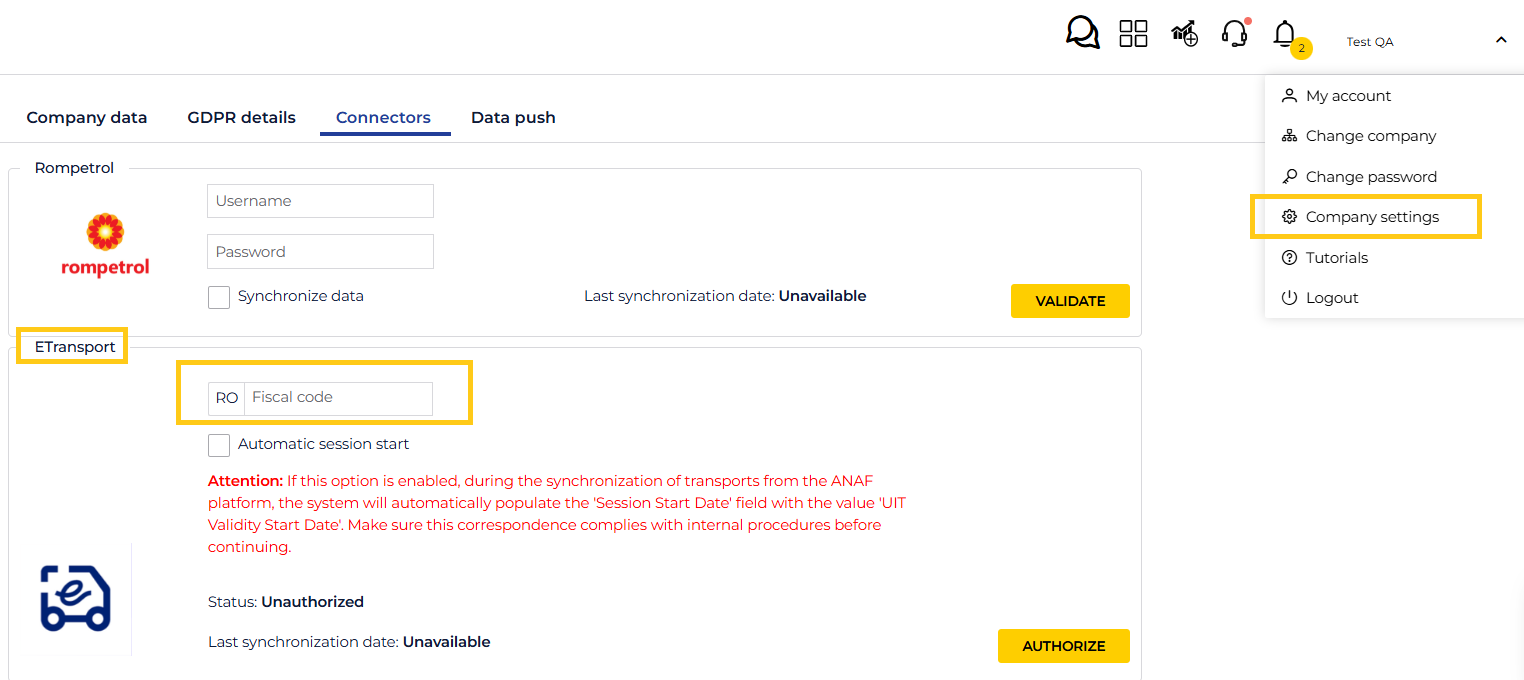
- Click “Authorize”, select the ANAF digital certificate from the displayed list, and after entering the password/PIN, the authorization will be completed in the platform.
- ANAF will provide a result based on the submitted digital certificate and an access token will be obtained. This token is valid for one calendar year. After this period expires, the authorization process must be repeated.
- Multiple authorization codes can be generated if there are several companies in a single account or if there are multiple users with admin rights. Authorization is performed at the user level.
- After authorization, the Status will display the message “Authorized”.
If synchronization of transports does not occur within 5 minutes, please check that the connector status is “Authorized”.
! There may also be situations where the ANAF platform is unavailable. In this case, synchronization cannot be performed. Please wait 30 minutes and, if the issue persists, contact the support team.